
Your customers are already interacting with your business, but are you managing those interactions in a way that builds trust and drives growth?
Questions arrive through email, live chat, social media, and contact forms. Website visitors browse quietly, then leave before they ask for help.
Valuable feedback gets buried in inboxes, while review requests happen inconsistently, or not at all. As these touchpoints multiply, delivering a responsive, personal customer experience becomes harder to manage.
Customer engagement software helps bring order to that chaos. Depending on the tool, it may help you chat with visitors, collect feedback, automate review requests, build knowledge bases, run surveys, or understand how customers use your product.
But a lifetime deal is only a smart buy when it solves a genuine operational problem. A low upfront price does not compensate for weak integrations, missing features, limited scalability, or a workflow your team will not actually use.
This guide examines the best customer engagement software on AppSumo based on real use cases, practical limitations, current costs, and business fit, not just headline discounts.
What Counts as Customer Engagement Software?
Customer engagement software helps businesses create, manage, and improve interactions throughout the customer relationship. It overlaps with several related tool categories, but each serves a different purpose.
Customer support focuses on resolving problems, typically through tickets, help desks, or support inboxes.
Customer experience covers the broader impression people form across every touchpoint, from purchasing to receiving help. Marketing automation primarily drives acquisition and conversion through campaigns, email sequences, and lead nurturing.
Customer engagement sits between them: it helps you actively listen to customers, communicate at the right time, and turn interactions into stronger relationships.
In practice, AppSumo tools in this space usually fall into five categories:
– Customer messaging and multichannel communication
– Website chatbots and AI-powered conversations
– Customer feedback and product improvement
– Reviews and online reputation management
– Customer onboarding and ongoing communication
You do not need every category. A local service business may mainly need automated review requests and a simple messaging inbox.
A SaaS company, by contrast, may need in-app onboarding, feature-request collection, feedback analysis, and proactive customer communication.
The best choice depends on the specific interaction you need to improve, not on how many engagement features a platform claims to offer.
Quick Comparison – Best Customer Engagement Tools on AppSumo
| Tool Name | Primary use case | Best suited for | Price |
|---|---|---|---|
| AnyChat | Omnichannel customer messaging and shared team inbox | Businesses managing website chat plus social or messaging-app conversations in one place | Check Live Price on AppSumo |
| Bit Assist | Multi-channel contact widget | Websites that want visitors to reach them through WhatsApp, phone, email, Messenger, and similar channels | Check Live Price on AppSumo |
| Answerly Banner | Website announcement and promotional banners | Businesses promoting offers, launches, updates, or important notices | Check Live Price on AppSumo |
| VanChat | AI sales and support chatbot for ecommerce | Shopify merchants seeking product discovery, automated FAQs, policy support, and higher conversions | Check Live Price on AppSumo |
| Support Board | Omnichannel live chat, AI chatbot, and help desk | Support teams centralizing website, social, and messaging conversations | Check Live Price on AppSumo |
| Feedback Link | Customer-feedback and testimonial collection | Agencies, consultants, service businesses, and SaaS teams collecting reviews and social proof | Check Live Price on AppSumo |
| Tiny Talk | AI chatbot trained on websites and documents | Businesses needing an embeddable FAQ, support, lead-generation, or internal knowledge bot | Check Live Price on AppSumo |
| Produktly | In-app product engagement: onboarding flows, feature announcements, feedback widgets, NPS/surveys, and roadmaps | SaaS products that need to guide users after signup, announce releases, and gather structured feedback without building these functions in-house | Check Live Price on AppSumo |
Also Read: What Is AppSumo Plus and Is It Worth It? A Complete Beginner’s Guide
Best Customer Engagement Software on AppSumo: Detailed Reviews
1. AnyChat
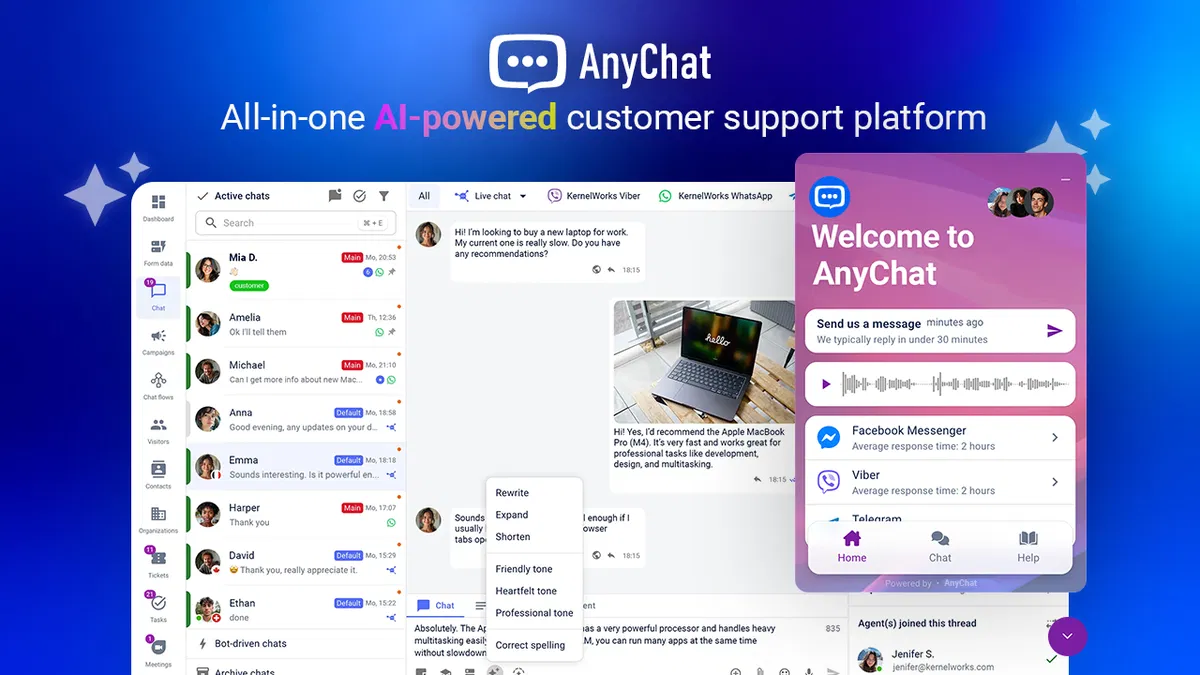
AnyChat is a multichannel customer messaging platform designed to bring conversations from popular social networks and messaging apps into one shared inbox.
Rather than making customers switch to email or a support portal, it lets businesses respond where people already communicate.
It is helpful for teams handling sales inquiries, support questions, and follow-ups across several channels.
What it does
AnyChat centralizes incoming messages from channels such as WhatsApp, Instagram, Facebook Messenger, Telegram, and website chat. Team members can manage conversations, assign them to colleagues, and use a single workspace instead of jumping between native apps.
Best use case
It is most useful for small businesses and agencies that receive a steady flow of customer inquiries through social media and messaging apps.
For example, a local clinic or e-commerce store can answer Instagram messages, WhatsApp questions, and website chat requests from one place.
Key features
– Unified inbox for multiple messaging channels
– Live website chat widget
– Shared team access, conversation assignment, and internal collaboration
– Contact profiles and conversation history
– Saved replies and message templates for faster responses
– Automation options for common questions and first responses
Who it is best for
Social-first businesses, local service providers, online sellers, and agencies managing client communications.
Pricing
AnyChat is available as a lifetime deal on AppSumo with 3 plans, namely Starter, Advanced, and Growth. The starting price is $49.
2. Bit Assist

Bit Assist is a customer-support widget that lets businesses place multiple communication options in one convenient button on their website. Visitors can choose how to contact the company, such as email, live chat, WhatsApp, Messenger, or other connected channels, without searching through separate contact pages.
What it does
Bit Assist creates a customizable, floating contact widget that can display communication channels, social profiles, booking links, forms, and other customer-engagement options. It is designed to make it easier for website visitors to start conversations or take action.
Also Read: 8 Best Social Media Management Tools on AppSumo
Best use case
It is most useful for small businesses, agencies, freelancers, and service providers that want to improve website accessibility without installing several separate widgets.
For example, a consultant could give visitors quick access to WhatsApp, email, Calendly, LinkedIn, and a contact form from one location.
Key features
– Floating website contact and communication button
– Multiple channels and links in one widget
– Custom icons, colors, labels, and positioning
– Mobile-friendly display
– Targeting or display controls for different pages
– No-code installation for most websites
– Potential white-label or agency-use options, depending on the plan
Who it is best for
Local businesses, consultants, freelancers, agencies, SaaS companies, and online stores that want to make customer contact easier from their websites.
Pricing
Bit Assist’s AppSumo lifetime deal price starts from $49. This covers 5 sites, over 21 channels, and unlimited widgets and channels. You can stack up to 4 codes for unlimited sites.
3. Answerly Banner

Answerly Banner is a website announcement-bar tool that helps businesses display important messages, promotions, alerts, and calls to action across their websites. It is designed to make time-sensitive information more visible without requiring a full pop-up, landing page, or custom development work.
What it does
Answerly Banner lets website owners create announcement banners that appear at the top or bottom of selected pages. A banner can be used to promote a sale, announce a product launch, share a shipping update, highlight a new blog post, collect signups, or direct visitors to another page.
Best use case
It is most useful for small businesses, marketers, agencies, online stores, and SaaS companies that need a simple way to communicate website-wide updates.
For example, an online shop could display a free-shipping announcement, while a SaaS company could promote a new feature or invite users to a webinar.
Key features
– Customizable website announcement banners
– Text, links, buttons, and calls to action
– Adjustable colors, typography, position, and appearance
– Options to show banners on selected pages or websites
– Responsive display for desktop and mobile visitors
– Scheduling or campaign controls, depending on the current plan
– No-code installation for most websites
– Agency or white-label functionality, if included in the AppSumo tier
Who it is best for
E-commerce stores, SaaS companies, agencies, freelancers, publishers, event organizers, and service businesses that need lightweight website messaging.
Pricing
Answerly Banner costs $29 on AppSumo, which includes unlimited banners, unlimited page views, 10 seats, and more.
4. VanChat

VanChat appears to be an AI-powered website chat solution designed to answer visitor questions, capture leads, and provide round-the-clock first-line support.
Unlike a basic contact widget, its core value is automating conversations from your business’s own knowledge sources.
What it does
VanChat lets businesses add an AI chat assistant to their website, typically trained on materials such as webpages, documents, FAQs, and product information.
It can respond to common pre-sales and support questions, point visitors toward relevant information, and potentially collect contact details when human follow-up is needed.
Check Also: 10 Best AppSumo Lead Generation Tools for Small Businesses – Top Lifetime Deals You Shouldn’t Miss
Best use case
It is most useful for businesses with repetitive inbound questions that want to reduce manual chat workload and improve response speed.
For example, a SaaS company could train it on its help center and pricing pages so visitors can ask, “Which plan includes API access?” before contacting sales.
Key features
– AI website chatbot for automated visitor conversations
– Knowledge-base training from website content, documents, or FAQs
– Always-on responses for support and sales questions
– Customizable chat-widget branding and appearance
– Lead capture and handoff to a human team, depending on the plan
– Conversation history or analytics, depending on the available tier
– No-code or low-code installation for most websites
– Potential multilingual capabilities, integrations, or white-label options depending on the AppSumo plan
Who it is best for
SaaS companies, e-commerce brands, agencies, course creators, online service businesses, and small support teams that want to answer common website questions faster without staffing chat continuously.
Pricing
On AppSumo, VanChat is available as a lifetime deal with 4 plans, and Plan 1 starts at $59. Plan 4 costs $499. You can visit the deal page, compare plans, and choose the right one for your business.
5. Support Board
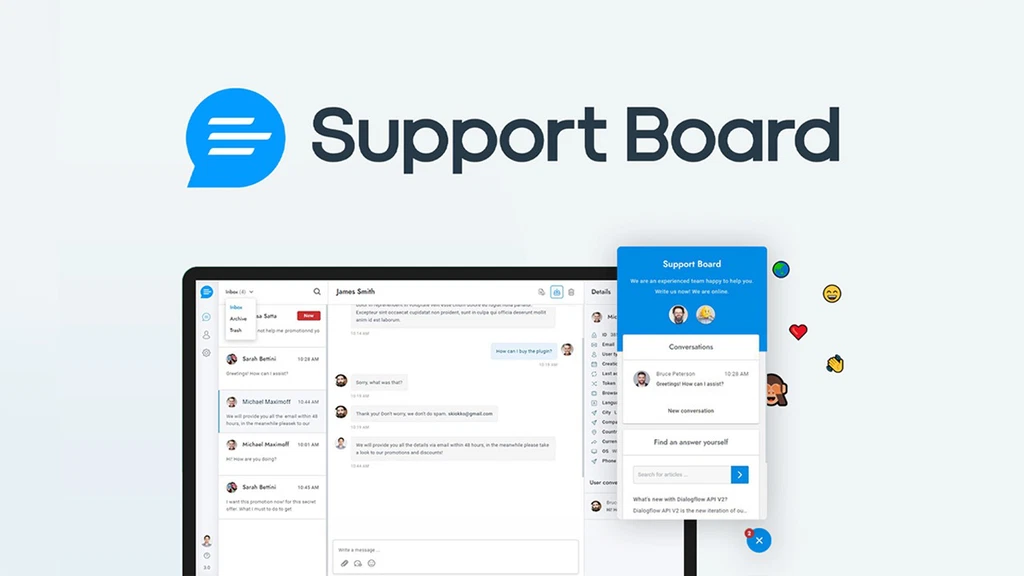
Support Board is a customer-support and live-chat platform designed to centralize website conversations, tickets, knowledge-base content, and automated responses in one system.
Compared with Bit Assist or Answerly Banner, it is a more complete support solution; compared with VanChat, it places greater emphasis on human-agent workflows and help-desk functionality.
What it does
Support Board typically adds a chat interface to a website and gives support teams a central dashboard for managing visitor conversations.
Depending on the configuration and plan, it may also support ticketing, email conversations, FAQs, knowledge-base articles, chatbot automation, and integrations with external messaging or business tools.
Best use case
It is most useful for businesses that need to manage ongoing customer conversations rather than simply display contact options.
For example, a SaaS company could use it to handle pre-sales questions in live chat, convert unresolved issues into tickets, let customers search FAQs, and keep support interactions organized in one place.
Key features
– Website live-chat widget
– Shared support inbox or agent dashboard
– Customer conversations and conversation history
– Ticketing or issue-management workflows
– FAQ and knowledge-base functionality
– Automated replies or chatbot features, depending on the setup
– Email-to-support or email-conversation management, where supported
– Agent accounts, permissions, and internal support workflows
– Customizable widget appearance and website embedding
– Integrations with messaging, CRM, automation, or e-commerce tools, depending on the plan
Who it is best for
– Small SaaS and software companies
– Agencies managing support for several clients
– Online stores with recurring customer questions
– Course creators and membership businesses
– Service companies that need organized customer follow-up
– Small teams moving beyond email-only support
Pricing
Support Board is available from $69 on AppSumo, which includes 10,000 messages per month, 1500K characters to train the chatbot, and 3 Agents. Higher plans come with higher limits, which you can view on AppSumo.
6. Feedback Link

Feedback Link appears to be a customer-feedback and testimonial-collection tool. Its likely purpose is to give businesses a simple way to request feedback, collect responses through shareable links or branded forms, and turn positive comments into testimonials or marketing content.
What it does
You would typically send customers a feedback link after a purchase, support interaction, project completion, or other milestone.
Customers can submit comments, possibly with ratings, names, photos, or video, and the business can review responses before displaying selected feedback publicly.
Best use case
It is most useful for agencies, freelancers, SaaS companies, consultants, course creators, and online stores that want a structured alternative to asking for testimonials manually.
For example, an agency could send a client a feedback link after launching a website, then use the client’s approved response on its homepage or case-study pages.
Also Read: 10 Best Email Marketing Software You Should Use [Top AppSumo Lifetime Deals Included]
Key features
– Branded feedback or testimonial-collection pages
– Shareable links for email, chat, invoices, or QR codes
– Custom questions, rating fields, and response forms
– Collection of written testimonials, and possibly video or image testimonials
– Approval or moderation before publication
– Embeddable testimonial widgets for websites
– Export, sharing, or social-media-friendly response formats
– Multiple campaigns, forms, or workspaces, depending on the plan
– Custom branding and white-label controls, depending on the AppSumo tier
Who it is best for
Feedback Link is a good fit for
– Freelancers and agencies collecting client testimonials
– SaaS companies requesting product feedback and social proof
– Consultants and service providers building credibility
– Course creators gathering student reviews
– E-commerce brands collecting post-purchase opinions
– Small businesses that currently request testimonials through email or messages
Pricing
Feedback Link’s lifetime deal costs $79 on AppSumo. This offers unlimited widget page views, 5000 invites per month, 1000 SMS starting text credits, 10 social proof widgets, and 8 video testimonials, shares, and reviews.
7. Tiny Talk

Tiny Talk is an AI chatbot creation tool that can create customized chatbots for your business, trained on your website & docs. You can embed it in your website and integrate with WhatsApp and APIs.
These custom AI chatbots will help increase conversions by minimizing operational costs.
What it does
After purchasing this tool, you will build custom AI chatbots that are trained with your business data. Your documents stay private and can only be accessed by users when they need answers to a specific question.
You can embed the created chatbots in your website, connect via APIs, or integrate with your WhatsApp handle. On the backend, you will get leads with essential data points for your business.
Best use case
Tiny Talk is great for SaaS companies, bloggers, course creators, and e-commerce businesses that want to solve customer problems while saving cost.
Key features
- Creates multiple chatbots for moods and personalities
- Maintains privacy of documents
- Easy to embed into your website
- Can be shared with APIs
- Integrates with WhatsApp
- Chat history and helpdesk are available
- Provides enriched leads for your business
Pricing
TinyTalk has a lifetime deal offer on AppSumo with 7 pricing plans. The pricing starts from $49. This includes 5 chatbots, 15M characters, and 15,000 messages per month. For higher limits and more features, you can explore higher plans on AppSumo.
8. Produktly

Produktly is a product-experience platform that helps SaaS businesses understand user behavior, collect feedback, guide onboarding, and communicate product updates without relying entirely on development resources.
It brings several customer-engagement functions into one tool, making it useful for teams that want to improve adoption and retention after signup.
What it does
Produktly combines in-app user onboarding, feedback collection, feature-request management, product announcements, and behavior analytics. Teams can use it to identify where users struggle, introduce features at the right moment, and gather evidence for product decisions.
Best use case
It is best for SaaS companies and web-app teams that need a lightweight way to improve activation and ongoing engagement. For example, a startup could create an interactive checklist for new users, announce a newly released feature in-app, and collect feedback directly from customers after they try it.
Key features
– Interactive product tours, tooltips, checklists, and onboarding flows
– In-app announcements, changelogs, and release notes
– Feedback widgets, satisfaction surveys, and feature-request boards
– User behavior analytics and event tracking
– Segmentation for showing messages or guides to relevant users
– A centralized view of customer feedback and product insights
Who it is best for
Early-stage SaaS teams, product managers, founders, and customer-success teams that want to improve onboarding, capture customer voice, and communicate product changes.
Pricing
Produktly’s lifetime deal on AppSumo starts from $79. What you get is all of its features, one admin, 10,000 triggers per month, and 200,000 views per month for announcements and roadmaps
These parameters are included in one code, so you can stack codes as per your requirements.
Which Customer Engagement Tool Should You Choose? Match the Software to Your Problem
If Customers Contact You Through WhatsApp and Social Media
Choose an omnichannel messaging tool such as AnyChat or Support Board. These centralize conversations from website chat, WhatsApp, Messenger, and social channels, so your team can respond without constantly switching apps. A traditional helpdesk works better for formal email tickets, SLAs, and complex case tracking.
If Your Website Visitors Keep Asking the Same Questions
An AI chatbot like Tiny Talk can answer repetitive questions around the clock, qualify leads, and direct visitors to relevant pages. But if questions are straightforward and stable, a clear FAQ or knowledge base may be cheaper, more accurate, and easier to maintain.
If Customers Rarely Leave Reviews
Use a review-request or testimonial collection tool such as Feedback Link when you mainly need a simple, branded way to ask satisfied customers for feedback.
Choose broader reputation management only if you must monitor multiple review platforms, respond publicly, and track brand sentiment at scale.
If Users Request Features but Never Hear Back
Use a feedback-management platform such as Produktly to collect requests, identify recurring priorities, publish a roadmap, and announce shipped improvements. The key value is closing the loop: customers should see that their input was considered, even when you decline a request.
If New Customers Struggle to Use Your Product
Adoption tools such as Produktly provide in-app walkthroughs, checklists, tooltips, and feature announcements. Support tools solve questions after users get stuck; onboarding tools reduce confusion before they need to ask.
Read: Are AppSumo Deals Really Worth It? Hidden Truth Most Buyers Ignore
Are AppSumo Lifetime Deals Actually Worth It for Customer Engagement?
AppSumo lifetime deals can be excellent value when they solve a specific, durable problem at a lower total cost than a monthly subscription. But “lifetime” usually means access for the life of the product, not a guarantee that the vendor, integrations, or included features will remain unchanged.
When a Lifetime Deal Makes Financial Sense
A deal is most compelling when your use case is stable, and usage is easy to forecast. For example, a small SaaS company may use Produktly for onboarding checklists, feature announcements, and feedback collection without needing enterprise-grade customization.
Buy when the plan includes the integrations you already need, such as your website platform, CRM, or messaging channels, and when its limits comfortably cover your expected users, contacts, or conversations.
Compare the one-time price with the recurring alternative over 2 – 3 years, including likely add-ons. A low upfront price is not a saving if you soon need paid upgrades.
When You Should Avoid a Lifetime Deal
Be cautious if the software will run mission-critical support. A downtime-prone inbox, weak security, or missing integrations can cost more in lost customer trust than the deal saves.
Also avoid deals with unclear export options, restrictive APIs, vague roadmaps, or functionality gaps you are hoping the vendor will fix later. AI chatbots and WhatsApp-style messaging deserve extra scrutiny: model usage, phone numbers, message templates, and third-party API fees may remain recurring costs even with “lifetime” access.
Frequently Asked Questions
What is the best customer engagement software on AppSumo?
The best option depends on your primary need: omnichannel messaging, AI-powered support, review collection, product-feedback management, or in-app onboarding. Choose software that directly addresses your biggest customer experience gap rather than the platform with the most features.
Which AppSumo tools support WhatsApp customer communication?
Choose only tools whose current product documentation explicitly confirms WhatsApp integration or API support. Deal availability and supported channels can change, so verify the AppSumo listing and vendor documentation before purchasing rather than relying on older comparison articles.
Can small businesses use customer engagement software without a support team?
Yes. Small businesses can use simple chat widgets, automated FAQ responses, appointment routing, and feedback forms to handle routine interactions. These tools reduce manual workload, capture leads, and surface customer concerns without requiring a dedicated support department.
Do AI customer engagement tools have additional costs?
Often, yes. Lifetime access may not cover AI credits, model usage, API calls, WhatsApp messaging fees, phone numbers, or third-party automation services. Review included allowances and overage pricing carefully, especially when customer conversations could grow quickly.
Final Verdict – Choose the Tool That Fixes Your Biggest Engagement Problem
The best AppSumo customer engagement tool is the one that solves your most urgent gap.
Choose an AI helpdesk or shared inbox if response times are the problem; select a chat or WhatsApp tool for faster conversations; use feedback, review, or onboarding software when retention and product adoption need attention.
Prioritize essential integrations, usage limits, data export, and any ongoing AI or messaging costs before the upfront deal price. Start with one clear use case, test the workflow during the refund period, and only then commit.
Related Articles
How AppSumo Works (And Why Creators Love It)
6 Best Analytics Tools on AppSumo for Small Businesses and Marketers
28 Best Appsumo Deals For Startups Every Founder Should Consider
25+ Best AppSumo Deals Under $100 for Bloggers, Marketers & Creators

TechnicalStudies was started by Neeladrinath with one simple idea — give Indian students a reliable place to figure out what’s actually worth their time and money. Every recommendation here is backed by careful research, real student feedback, and honest analysis. We cover online courses, laptops, smartwatches, software deals, and learning resources — all looked at from a student’s perspective, so you can spend less time guessing and more time learning.