
Last updated on June 27th, 2026 at 11:12 am
Imagine clicking on a website and waiting… and waiting… and waiting. Frustrating, right? You probably hit the back button without a second thought. And guess what, so does everyone else.
A slow website doesn’t just annoy visitors. It quietly kills your bounce rate, drains your conversions, and tanks your search rankings, often without you even realizing it.
That’s exactly why website speed matters: it’s not just a technical checkbox. It’s the difference between a visitor staying or leaving, ranking or disappearing.
In this guide, we’ll break down how page speed impacts your SEO, your users, and what you can actually do to fix it.
What Is Website Speed?
Most people think website speed is simple: how fast a page loads. But there’s actually a bit more to it than that.
Website Speed vs. Page Speed
Website speed refers to the overall performance of your entire site. How quickly do multiple pages load across different devices and connections?
Page speed, on the other hand, is specific to a single page; how fast that particular page loads for a user.
Load Time vs. Perceived Performance
Here’s where it gets interesting. There are actually two ways to think about speed.
- Actual load time is the technical time it takes for all elements on a page to fully load
- Perceived performance is how fast the page feels to the user
A page might technically take 4 seconds to fully load, but if the main content appears in 1.5 seconds, users feel like it’s fast. That perception matters just as much as the raw numbers.
Why Website Speed Matters for SEO
Back in 2010, Google announced page speed as a ranking factor for desktop. Then, in 2018, they rolled it out for mobile too with the Mobile Speed Update.
And with the rise of mobile-first indexing, where Google primarily uses the mobile version of your site to determine rankings, speed has never been more critical.
Google’s entire business depends on sending users to websites that deliver great experiences. A slow website is a bad experience. So naturally, Google pushes faster websites higher in search results.
For example, if your competitor’s page loads in 1.5 seconds and yours crawls in at 6 seconds, all else being equal, they’re winning that ranking battle.
Core Web Vitals Explained
In 2021, Google made Core Web Vitals officially part of the page experience ranking signal.
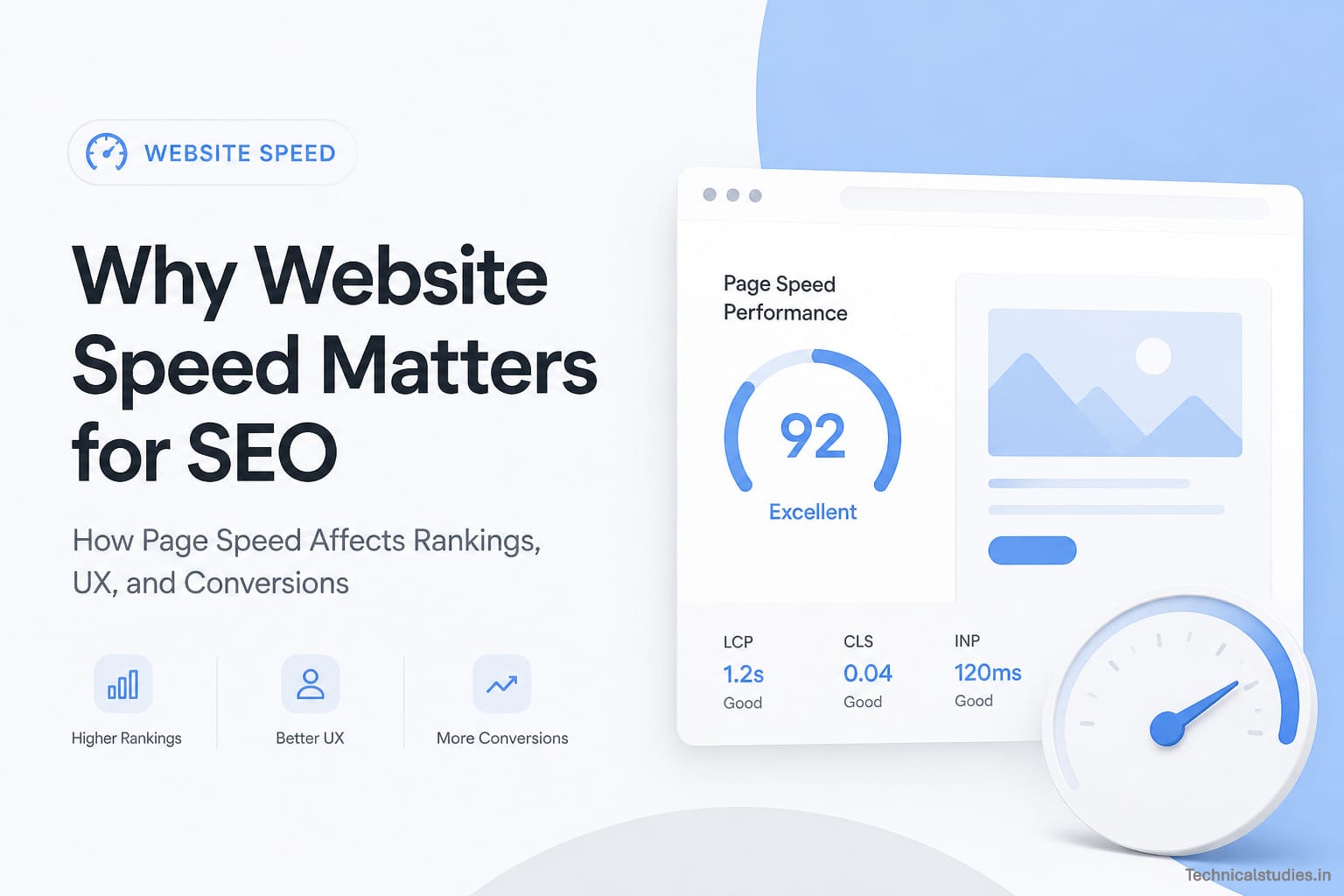
These are a set of specific, real-world performance metrics known as LCP, CLS, and INP. Think of them as Google’s report card for your website’s speed and usability.
LCP — Largest Contentful Paint
What it measures: How long it takes for the largest visible element on your page, usually a hero image, headline, or video, to fully load.
Why it matters: This is what users see first. If your main content takes forever to appear, visitors assume the page is broken and leave.
Google’s benchmark:
- Good: Under 2.5 seconds
- Needs Improvement: 2.5 – 4 seconds
- Poor: Over 4 seconds
CLS — Cumulative Layout Shift
What it measures: How much your page content unexpectedly jumps around while loading, like a button shifting right before you click it.
Why it matters: Nothing frustrates users more than accidentally clicking the wrong thing because the layout shifted. It’s jarring, annoying, and signals a poorly built page to Google.
Google’s benchmark:
- Good: Under 0.1
- Needs Improvement: 0.1 – 0.25
- Poor: Over 0.25
INP — Interaction to Next Paint
What it measures: How quickly your page responds when a user interacts with it, clicking a button, opening a menu, or filling out a form.
Why it matters: INP replaced the old FID (First Input Delay) metric in March 2024, and for good reason. It measures all interactions throughout the page visit, not just the first one, giving a much fuller picture of responsiveness.
Google’s benchmark:
- Good: Under 200 milliseconds
- Needs Improvement: 200 – 500ms
- Poor: Over 500ms
Speed doesn’t just affect rankings; it affects whether your pages get found in the first place.
The Crawl Budget Problem
Google sends bots (called Googlebots) to crawl and index your website. But the thing is, those bots don’t have unlimited time to spend on your site.
Each website gets a crawl budget: a limit on how many pages Google will crawl in a given period.
When your site is slow, Googlebot crawls fewer pages before moving on. That means:
- New blog posts take longer to appear in search results
- Updated pages stay outdated in Google’s index
- Deeper pages on your site may never get crawled at all
For large websites with hundreds or thousands of pages, this is a serious problem.
Faster Sites Get Indexed Faster
On the flip side, fast websites are rewarded. Googlebot can crawl more pages in less time, which means fresh content gets indexed quicker, product updates and new landing pages show up in search faster, and your entire site stays more current in Google’s eyes.
How Website Speed Affects User Experience
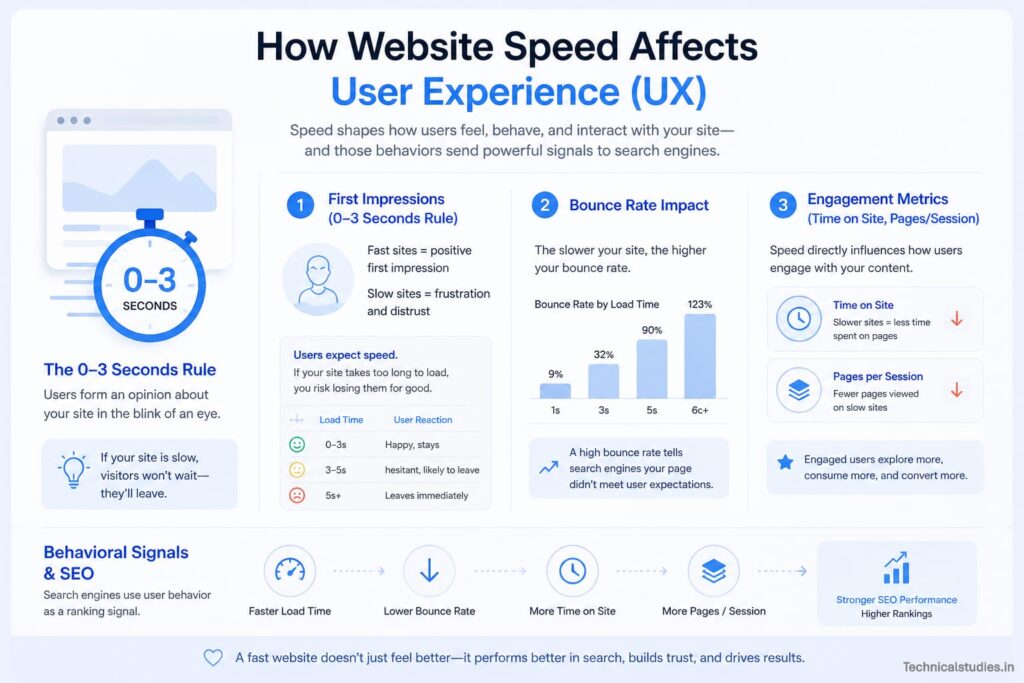
SEO and user experience might seem like two separate worlds, but they’re deeply connected. And nothing reveals that connection more clearly than page speed. Here is how speed shapes every single interaction a visitor has with your site.
The 0–3 Second Rule: First Impressions Are Everything
Research has consistently shown that users expect a website to load in 3 seconds or less. After that, patience runs out fast.
- 1–2 seconds: Smooth, satisfying experience. The user is engaged.
- 3 seconds: Roughly 40% of visitors abandon the page entirely.
- 5+ seconds: You’ve lost the majority of your audience before they’ve even seen your content.
Bounce Rate: The Silent SEO Killer
When a visitor lands on your page and leaves without interacting, that’s a bounce. And slow load times are one of the biggest drivers of high bounce rates.
When users consistently land on your page and immediately leave, it sends a clear signal to Google, “this page isn’t delivering what users want.” Over time, that behavioral pattern can quietly drag your rankings down.
A fast page keeps visitors around long enough to actually engage with your content. A slow one sends them straight back to the search results, and often straight to your competitor.
Related: How to Improve Website User Experience: 12 Proven Optimization Tips
Engagement Metrics: What Happens After the First Click
Speed doesn’t just determine whether someone stays. It shapes how deeply they explore your site. Two key metrics tell this story.
Time on Site
When pages load quickly, users are more likely to read, scroll, and actually consume your content. When they’re slow? Users get impatient, skim less, and leave sooner.
More time on site signals to Google that your content is valuable and relevant, which supports stronger rankings over time.
Pages Per Session
A fast website creates a frictionless browsing experience. Visitors naturally click through to more pages: a related blog post, a product page, a contact form. A slow site breaks that momentum.
Every extra second of loading friction is a reason for someone to stop exploring and close the tab.
Behavioral Signals: The Hidden SEO Connection
Google doesn’t just look at links and keywords. It watches how users behave on your site.
These behavioral signals include:
- Bounce rate: Did they leave immediately?
- Dwell time: How long did they actually stay?
- Pogo-sticking: Did they bounce back to Google and click a competitor’s result instead?
What Causes a Slow Website?
Before you can fix a speed problem, you need to understand where it’s coming from. Most slow websites share the same handful of root causes. Let’s walk through each one.
Heavy Images and Media
Images are the number one culprit behind slow websites, and the fix is massively overlooked.
Most people upload high-resolution photos straight from their camera or stock site; we’re talking 4MB+ files. Multiply that across 8–10 images, a background video, and an animated banner, and your page is essentially downloading a small movie on every visit.
Uncompressed, oversized, wrongly formatted images are the biggest drag on load time.
Modern formats like WebP deliver the same visual quality at a fraction of the size, yet most websites are still stubbornly serving bulky JPEGs and PNGs from years ago.
Poor Hosting Performance
Your web host is your website’s foundation. Decorate it beautifully all you want, but if the foundation is weak, everything suffers.
Cheap shared hosting means your site lives alongside hundreds of other websites, all fighting for the same server resources. When their traffic spikes, your speed drops.
Other hosting speed killers include distant server locations adding latency, outdated PHP versions, lack of HTTP/2 support, and no CDN pushing content from a single central server to visitors worldwide.
Upgrading to quality managed hosting, or simply adding a CDN, can deliver dramatic speed improvements overnight, without touching a single line of code.
Too Many Scripts and Plugins
This one is a trap, especially on WordPress websites.
Every plugin adds code. Every third-party script, analytics, live chat, popups, and ad trackers add another browser request before your page finishes loading.
Individually, each adds 50–100 milliseconds. Stack up 20 plugins and 15 scripts? You’ve quietly added 2–3 unnecessary seconds to your load time.
No Caching or Compression
These two fixes sound technical, but they’re not. And skipping them is leaving serious speed gains on the table.
Caching is your website’s memory. A visitor’s browser saves your logo, fonts, and CSS files locally on their first visit, so every return visit loads those elements instantly instead of re-downloading them from scratch.
Compression, GZIP or Brotli, works like a zip file for your code. It shrinks HTML, CSS, and JavaScript files by up to 70–80% before sending them to the browser, which unpacks them instantly.
Both can be enabled through your hosting control panel or a caching plugin.
Unoptimized Code (CSS, JS, and HTML)
A clean-looking website can still be hiding messy code underneath, especially one that’s been updated, redesigned, or touched by multiple developers over time.
The usual suspects include render-blocking CSS and JavaScript halting page display, unused stylesheets bloating file sizes, unminified code packed with spaces and comments browsers don’t need, and dozens of separate files loading one by one instead of being together.
Minifying your CSS and JavaScript strips out unnecessary characters, reducing file sizes meaningfully. Deferring non-critical scripts lets visible content load first, making your page feel faster even before it’s fully loaded.
Related: 12 Powerful Benefits of WordPress That Make It the #1 CMS
How to Improve Website Speed: Actionable Fixes That Actually Work
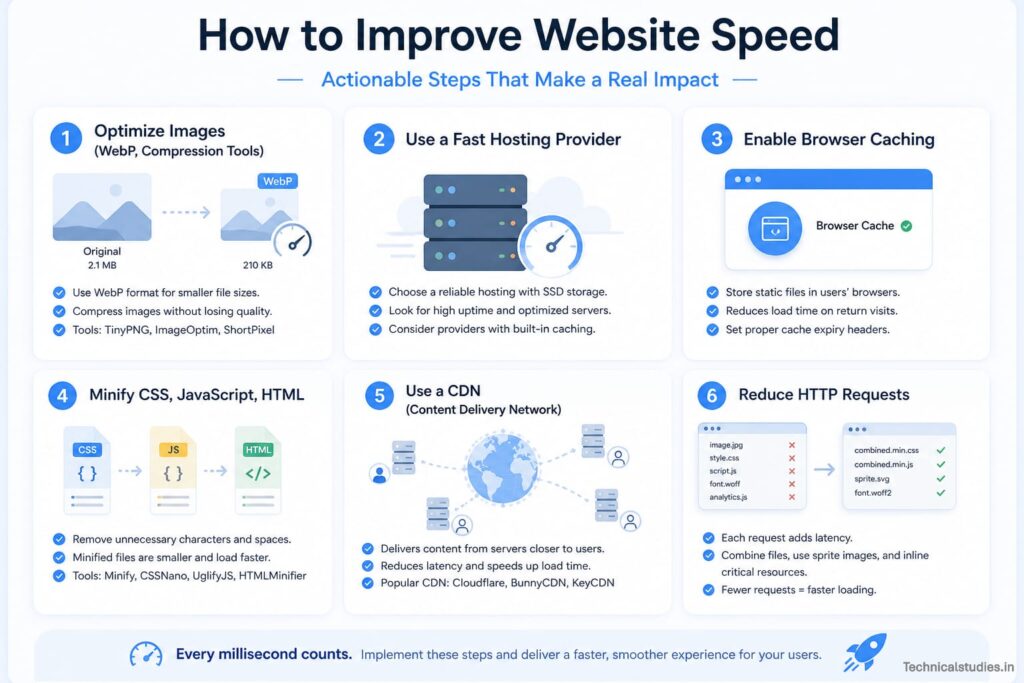
You now know why speed matters and what’s causing the problem. Now let’s talk about exactly how to fix it.
Optimize Your Images
Images are your biggest performance problem, and your biggest optimization opportunity. Done right, image optimization alone can cut load times by half.
Choose the Right Format
- WebP for everything possible – same quality, 25–35% smaller than JPEG/PNG
- JPEG for photographs
- PNG only when transparency is needed
- SVG for logos and icons
Compress Before You Upload
Never upload raw files straight from your camera or stock site. Use Squoosh, TinyPNG, or WordPress plugins like ShortPixel or Imagify to compress first.
Resize to Display Size
If an image displays at 800px wide, don’t upload a 4000px version. Oversized images are one of the most common and most avoidable speed mistakes.
Enable Lazy Loading
Load images only when users scroll to them, not all at once. In WordPress, it’s often built in. On custom sites, simply add loading=”lazy” to your image tags.
Use Responsive Images
Serve appropriately sized images to each device. Mobile users don’t need desktop-sized files. The srcset attribute handles this automatically, or your optimization plugin will.
Use a Fast, Reliable Hosting Provider
No amount of optimization compensates for bad hosting. It’s the foundation everything else is built on, so invest in it accordingly.
Hosting Options at a Glance:
| Hosting Type | Speed | Best For |
|---|---|---|
| Shared | Slow | Personal blogs, tiny sites |
| VPS | Medium-Fast | Growing businesses |
| Managed WordPress | Fast | Performance-focused WP sites |
| Dedicated Server | Very Fast | High-traffic, enterprise |
| Cloud | Fast + Scalable | E-commerce, variable traffic |
What to Look for:
- SSD storage over traditional HDD
- HTTP/2 or HTTP/3 support
- Latest PHP version (8.x for WordPress)
- Server-level caching is built in
- Server locations close to your audience
Enable Browser Caching
Caching tells browsers: “Store these files locally — don’t re-download them on every visit.” The result? Repeat visitors experience near-instant page loads.
How to Enable It:
WordPress: Install a caching plugin:
- WP Rocket — premium, easiest to configure
- W3 Total Cache — free, powerful, slightly technical
- LiteSpeed Cache — free, excellent on LiteSpeed servers
Non-WordPress: Add cache-control headers to your .htaccess (Apache) or nginx.conf (Nginx) file. Your host’s documentation has the exact code.
How Long to Cache:
- Images, fonts, CSS, JS → 1 year (they rarely change)
- HTML pages → Hours or days (content updates more frequently)
Go one step further with object caching. Redis or Memcached stores database query results so your server isn’t repeating the same lookups on every load. Most quality managed hosts include this built-in.
Minify CSS, JavaScript, and HTML
Minification strips out everything browsers don’t need, spaces, line breaks, comments, and indentation, shrinking file sizes without changing how anything works.
Before:
/* Main navigation styles */
.nav-menu {
    display: flex;
    background-color: #ffffff;
    padding: 20px 40px;
}
After:
.nav-menu{display:flex;background-color:#fff;padding:20px 40px}Same result. Smaller file. Faster load.
WordPress: Most caching plugins handle this automatically:
- WP Rocket → File Optimization settings
- Autoptimize → Free, dedicated minification
- LiteSpeed Cache → Built into its optimization suite
Non-WordPress: Use CSSNano or CleanCSS for CSS, UglifyJS or Terser for JavaScript. Build tools like Webpack, Vite, or Gulp can automate everything.
Two bonus techniques worth adding:
- Defer: Downloads scripts in the background, executes after page load. Perfect for non-critical scripts.
- Async: Downloads and executes scripts without blocking page rendering.
Adding defer or async to your JavaScript tags is a small change with a noticeable impact on perceived load speed.
Use a CDN (Content Delivery Network)
A CDN is one of the most powerful and underused speed tools available, especially if your audience spans multiple regions.
How It Works: Without a CDN, every visitor, whether in Mumbai, Manchester, or Miami, downloads content from your single origin server. The further they are, the slower the experience.
A CDN stores copies of your static assets (images, CSS, JS, fonts) across a global server network, serving each visitor from the location closest to them.
Instead of one bakery serving the entire country, it’s a franchise in every city. Everyone gets served fast.
Popular Options:
- Cloudflare (free plan) — most widely used, includes security and DNS
- BunnyCDN — affordable, great for media-heavy sites
- Amazon CloudFront — enterprise-grade, pay-per-use
- KeyCDN — developer-friendly, transparent pricing
- Fastly — premium performance for larger publishers
Beyond speed, a CDN also delivers:
- Reduced origin server load
- Better uptime during traffic spikes
- Built-in DDoS protection
- Stronger performance for international audiences
Reduce HTTP Requests
Every image, CSS file, JavaScript file, and font requires a separate HTTP request. More requests mean longer load times. Here’s how to cut them down without sacrificing functionality.
Combine Files: Merge 8 CSS files into one. Bundle multiple JavaScript files together. Fewer files = fewer requests = faster loading. Your caching plugin or build tool can handle this automatically.
Remove Unnecessary Plugins and Scripts: Every inactive plugin still generates requests. If it’s not actively improving UX or conversions, delete it.
Use CSS Instead of Images: Gradients, shadows, rounded corners, and simple shapes can all be created with pure CSS, no image file, no HTTP request needed.
Inline Critical CSS: Embed above-the-fold styles directly in your HTML <head> to eliminate one request for your most important rendering styles.
Load Third-Party Scripts Smartly: Analytics, chat widgets, and social embeds are frequent offenders. Load them asynchronously, consolidate them through Google Tag Manager, and delay non-essential scripts until after the page is interactive.
Audit with Chrome DevTools: Hit F12, open the Network tab, and reload your page. You’ll see every request, what it is, how large it is, and how long it took.
Related: 12 Best Website Builders for Beginners
What Is a Good Website Speed?
The golden rule of website speed is simple:
Your website should load in 3 seconds or less. Under 2 seconds is excellent. Under 1 second is world-class.
| Load Time | Rating | Real-World Impact |
|---|---|---|
| Under 1 second | Exceptional | Near-instant experience, maximum engagement |
| 1–2 seconds | Excellent | Fast, smooth, users are happy |
| 2–3 seconds | Good | Acceptable, minor friction |
| 3–5 seconds | Below Average | Noticeable delay, bounce rate rising |
| 5–7 seconds | Poor | Significant abandonment, rankings suffering |
| 7+ seconds | Critical | Most visitors have already left |
Final Thoughts: Speed Is Not Optional Anymore
Throughout this guide, I’ve covered a lot of ground, from Google’s ranking algorithms to Core Web Vitals, from bounce rates to abandoned carts, from bloated images to CDN networks.
But if there’s one single thread running through every section, it’s this: Website speed is not a technical nicety. It’s a business necessity.
The internet is faster than it’s ever been. Users’ expectations are higher than they’ve ever been. And Google’s standards are stricter than they’ve ever been.
In that environment, a slow website isn’t just a minor inconvenience; it’s a competitive liability. Every day you leave it unaddressed is another day of lost rankings, lost visitors, and lost revenue.
So test your site. Find the bottlenecks. Start optimizing.
Frequently Asked Questions
Why does website speed matter for SEO?
Because Google wants to send users to sites that work properly, if your site is slow, you’re not providing a good experience, and Google simply doesn’t want to rank you.
What is a good page load speed?
A good page load time is under 3 seconds. Under 2 seconds is excellent. Google recommends hitting “Good” thresholds across all Core Web Vitals — LCP under 2.5s, CLS under 0.1, and INP under 200 milliseconds.
How does page speed affect conversions?
Every 1-second delay can reduce conversions by up to 7%. Slow pages trigger doubt, frustration, and cart abandonment. Faster pages build trust, keep visitors engaged longer, and create a frictionless path toward taking action on your site.
What causes a website to load slowly?
The most common culprits are unoptimized images, cheap shared hosting, too many plugins and third-party scripts, no caching or compression enabled, and bloated, unminified CSS and JavaScript code unnecessarily slowing down every single page load.
How can I test my website speed for free?

Use these three free tools: Google PageSpeed Insights, GTmetrix, and Pingdom. In my experience, I usually start with PageSpeed Insights because it provides the most direct insights into Google’s specific requirements.
More Articles
10 Ways AI Is Changing Web Design – Impact of AI in Web Design
A Beginner’s Guide to Creating Single Page Applications (SPAs)
Best SEO Tools To Enhance Your Website Performance in [Expert Picks]
Best Web Analytics Tools To Improve Your Website

TechnicalStudies was started by Neeladrinath with one simple idea — give Indian students a reliable place to figure out what’s actually worth their time and money. Every recommendation here is backed by careful research, real student feedback, and honest analysis. We cover online courses, laptops, smartwatches, software deals, and learning resources — all looked at from a student’s perspective, so you can spend less time guessing and more time learning.