

Your hosting is the foundation everything else sits on. It decides how fast your pages load, whether your blog stays up during a traffic spike, how well you’re protected from attacks, and, because Google now treats page speed and Core Web Vitals as ranking signals, how well you actually perform in search.
A slow, unreliable host quietly caps your blog’s growth long before content or SEO strategy becomes the bottleneck.
This is also where most new bloggers make their first costly mistake: picking the cheapest plan available.
A ₹49/month hosting deal often means shared servers overloaded with hundreds of other sites, sluggish load times, and support that disappears the moment something breaks. Cheap and right for your blog are not the same thing.
So what should you actually evaluate? For bloggers in India specifically, the factors that matter are performance, real (not introductory) pricing, renewal costs, WordPress compatibility, server location relative to your audience, backup frequency, room to scale, and the quality of support when things go wrong.
There’s no single “best” host for every blogger, and a beginner’s needs look nothing like high-traffic affiliate sites. This article breaks down which hosting fits which situation, so you can choose based on where your blog actually is.
By the end of this article, you will firmly understand which web hosting is right for your blog and how it contributes to growing your online business. Let’s get started.
Quick Answer: Which Is the Best Web Hosting for Blogging in India?
If you just want a starting point: Hostinger is the best overall pick for most Indian bloggers.
It balances low entry cost, solid speed, and WordPress-friendly tools without the brutal renewal jump some competitors spring on you.
But “best overall” isn’t “best for you” because your answer depends on your budget, traffic stage, and how much hand-holding you need.
- Best overall: Hostinger – strong performance-to-price ratio, easy WordPress setup, reasonable renewal pricing
- Best for beginners: Hostinger or GoDaddy – simple dashboards, guided setup, low entry cost
- Best budget option: BigRock – the cheapest entry price in this list, workable for a first blog with minimal traffic
- Best for WordPress: Bluehost – officially recommended by WordPress.org, pre-optimized WordPress environment.
- Best for growing/high-traffic blogs: SiteGround – Google Cloud infrastructure, daily backups, and staging tools built for scale
- Best premium option: SiteGround – you pay more, but get noticeably better uptime consistency and support quality
Here’s how the five stack up side by side
| Provider | Starting Price | Renewal Price | Storage | Websites Allowed | Free SSL | Backups | CDN | Best For |
|---|---|---|---|---|---|---|---|---|
| Hostinger | ₹149/mo (Premium, long-term plan) | ~₹449/mo | 20 GB SSD | 3 | Yes | Weekly (included) | Yes (free) | Beginners, overall value |
| Bluehost | ~₹199/mo (Starter) | ~₹349/mo | 10 GB NVMe | 10 | Yes | Basic (paid upgrade for daily) | Yes | WordPress blogs |
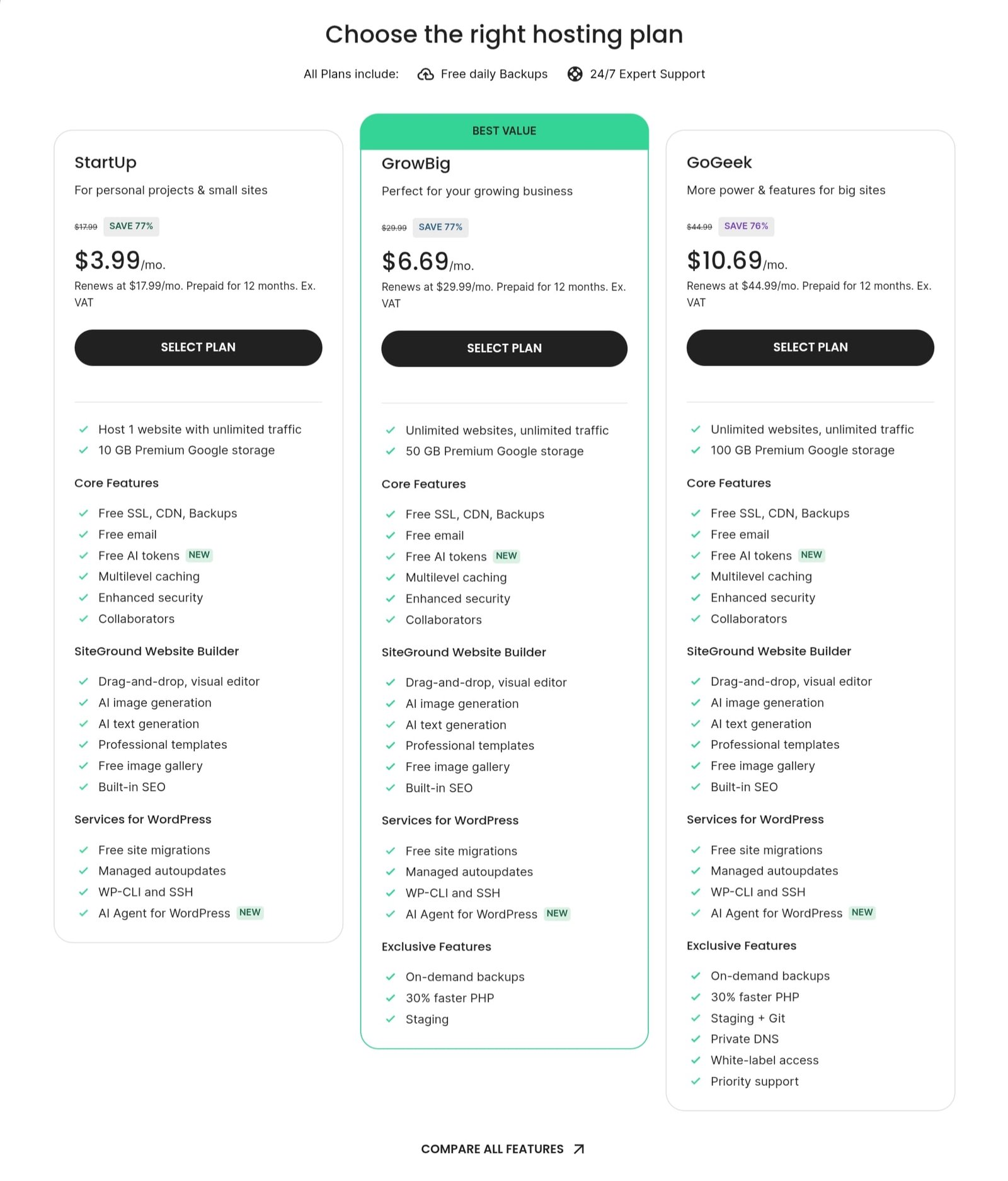
| SiteGround | ~$3.99/mo (StartUp) | ~$17.99/mo | 10 GB SSD | 1 | Yes | Daily (included) | Yes (Cloudflare) | High-traffic/growing blogs |
| GoDaddy | ~₹219/mo (Economy) | ~₹599/mo | 25 GB | 1 | Yes (1st year) | Paid add-on | Paid add-on | Beginners wanting bundled domain tools |
| BigRock | ~₹69/mo (Starter) | ~₹409/mo | 20 GB | 1 | Yes | Basic | Limited | Absolute lowest budget |
What Makes a Web Hosting Service Good for Blogging?
Before comparing providers, it helps to know what you’re actually evaluating.
Most hosting reviews throw around words like “fast” and “reliable” without explaining what those words mean in practice, or why they matter specifically for a blog rather than, say, an online store. Here’s what each criterion actually means for you.
1. Fast Server Performance
Speed isn’t a single number; it’s a combination of several things working together, and understanding each one helps you read hosting spec sheets instead of just trusting marketing copy.
Server response time (also called Time to First Byte, or TTFB) is how long the server takes to start sending data after a visitor requests your page. This happens before your content even begins loading, so a slow TTFB drags down every other speed metric downstream.
Anything under 200ms is good; shared hosting in India commonly runs 150–300ms depending on server load.
SSD/NVMe storage matters more than most beginners realize. Traditional hard drives (HDDs) are mechanical and slow; SSDs are faster; NVMe SSDs are faster still, often 5-10x quicker at reading data than standard SATA SSDs.
For a blog, especially a WordPress one, this directly affects how fast your database queries return. Every page load pulls post content, comments, and metadata from a database, so storage speed compounds across your entire site.
CPU/RAM resources determine how many simultaneous visitors your site can serve without slowing down.
On shared hosting, you’re splitting these resources with other websites on the same server, which is why a shared plan that looks generous on paper can still feel sluggish if the server is oversold.
Caching stores a ready-made version of your page so the server doesn’t have to rebuild it from scratch for every visitor.
Good hosts include server-level caching (not just a WordPress plugin), which is meaningfully faster because it happens closer to the server hardware.
CDN availability (Content Delivery Network) copies your site’s static files, images, CSS, and JavaScript to servers around the world, so a reader in Chennai isn’t waiting on a request that has to travel to a data center in Singapore or the US for every asset.
For Indian bloggers writing for an Indian audience, pairing a CDN with a nearby data center (or one that has strong Indian edge nodes) matters more than most hosting comparisons admit.
2. Reliable Uptime
Uptime is the percentage of time your site is actually accessible.
It sounds like a formality until your blog goes down during a traffic spike – say, a post gets shared widely, or you’re running an affiliate campaign – and every minute offline is a lost reader and lost revenue.
Here’s what most people miss: every host claims 99.9% uptime. That’s the industry-standard marketing number, and it’s nearly meaningless on its own because it’s rarely independently verified. What you should actually look for:
- Whether the provider publishes a Service Level Agreement (SLA) with actual compensation for downtime, not just a promise
- Independent uptime monitoring reports (third-party tools like UptimeRobot data, when reviewers publish it) rather than the host’s self-reported figures
- Whether outages, when they happen, are brief and rare, versus frequent short drops that don’t show up in monthly averages but still cost you readers
A blog that’s down for 45 minutes once a year is in a completely different category from one with dozens of 2-minute outages, even if both technically hit “99.9%.”
3. WordPress Compatibility
Since the overwhelming majority of Indian bloggers build on WordPress, hosting quality here isn’t optional; it shapes your entire day-to-day experience.
One-click WordPress installation means you can go from signup to a live WordPress site in minutes, without manually configuring databases or uploading files via FTP.
Every host in this comparison offers this now, so it’s less of a differentiator than it used to be, and the real differences show up in what comes next.
Automatic updates for WordPress core, themes, and plugins matter because outdated WordPress installs are the single most common way blogs get hacked.
A host that handles this for you (or lets you toggle it easily) reduces your security risk without extra effort on your part.
Read Also: Why Website Speed Matters for SEO: How Page Speed Impacts Rankings, UX, and Conversions
WordPress optimization refers to server-level tuning specifically for how WordPress works; PHP versions tuned for WordPress performance, object caching, and database optimization built into the hosting stack rather than bolted on via plugins.
Staging and management features let you test theme changes, plugin updates, or redesigns on a copy of your site before pushing them live. This matters more as your blog grows.
A broken update on a site with zero traffic is a minor annoyance; the same mistake on a site earning ad or affiliate revenue is a real cost.
4. Affordable Pricing Beyond the First Year
This is where most “best hosting” comparisons quietly mislead readers, because they compare promotional pricing, the eye-catching first-term rate, as if it’s the ongoing cost.
The pattern across nearly every major host, Indian or international, looks like this: you sign up for a long-term plan (often 24 or 48 months) at a steep discount, and when that term ends, the plan renews at 3–7x the price you originally paid.
This isn’t a hidden fee exactly; it’s disclosed, usually in fine print, but it’s structured to be easy to miss.
The number that actually matters is your long-term hosting cost: what you’ll pay across 2–3 years, including renewal, not just what you pay to sign up.
Domain renewal and other additional charges compound this. Many hosts bundle a “free domain” with your first year, then renew that domain at market rate afterward, often ₹800–1,500/year depending on the extension.
Add-ons like daily backups, premium SSL, or malware scanning, which some hosts include by default and others charge extra for, can meaningfully change your effective monthly cost.
5. Regular Backups
For a blog, backups aren’t optional insurance; they’re the only real protection against a bad plugin update, a hacking attempt, or simple human error (like accidentally deleting a post or breaking your site with a theme change).
Without a recent backup, recovering from any of these means starting over.
Why backups are essential for bloggers specifically: unlike a static brochure website, a blog’s value is almost entirely in its content, like years of posts, comments, and search rankings built up over time.
Losing that isn’t just inconvenient; it can mean losing your SEO equity and starting your domain’s authority from zero.
Backup frequency and restoration options are what separate a genuinely useful backup system from a checkbox feature. Daily backups are meaningfully better than weekly ones if something goes wrong mid-week.
Equally important is how backups are restored – a one-click restore from your hosting dashboard is far more useful in a crisis than needing to email support and wait hours (or days) for help.
6. Scalability
Most new bloggers start on shared hosting because it’s affordable, but it’s worth thinking one step ahead: what happens when your traffic grows?
Shared hosting has a ceiling. Because you’re splitting server resources with other sites, there’s a point, often somewhere between 20,000 and 50,000 monthly visitors, depending on the host and plan, where performance starts to degrade under load, especially during traffic spikes.
The better hosts make the path from shared hosting to cloud or VPS hosting simple: upgrading within the same account, without migrating your site elsewhere or facing significant downtime. This matters even if you don’t need it on day one.
7. Customer Support
Availability, whether support is offered 24/7 or only during business hours, matters more than it seems, because website problems don’t wait for convenient timing.
A plugin conflict that takes your site down at 11 PM needs the same urgency as one at 11 AM.
Response times vary enormously between hosts and even between support channels at the same host. Live chat is typically fastest; email tickets can take hours to days depending on the provider.
Support quality for beginners is arguably the most overlooked factor of all.
A support agent who can walk a first-time blogger through a WordPress error in plain language is far more valuable than one who’s technically correct but assumes you already understand server terminology.
Best Web Hosting for Blogging in India: Our Top Picks
1. Hostinger – Best Overall / Best for Beginners

Who it’s best for: New bloggers who want the best mix of performance, price, and room to grow, without needing technical know-how to get set up.
Key hosting features
Hostinger’s Premium shared plan gives you 20GB SSD storage, room for up to 3 websites, a free domain for the first year, weekly backups, a built-in CDN, and its own hPanel dashboard in place of traditional cPanel.
Its entry-level Single plan strips this down to one website and 10GB storage for an even lower price, aimed purely at a first blog.
Performance
Hostinger runs on LiteSpeed servers with NVMe storage on its higher tiers, and includes a CDN and object caching on Unlimited and Cloud plans.
It offers an infrastructure that several competitors reserve for pricier tiers or sell as an add-on. This is a meaningful part of why it benchmarks well for the price.
WordPress experience
One-click WordPress installs, an AI-assisted setup flow, and LiteSpeed caching built for WordPress specifically. It’s officially recommended by WordPress.org, alongside Bluehost.
Pricing and renewal considerations
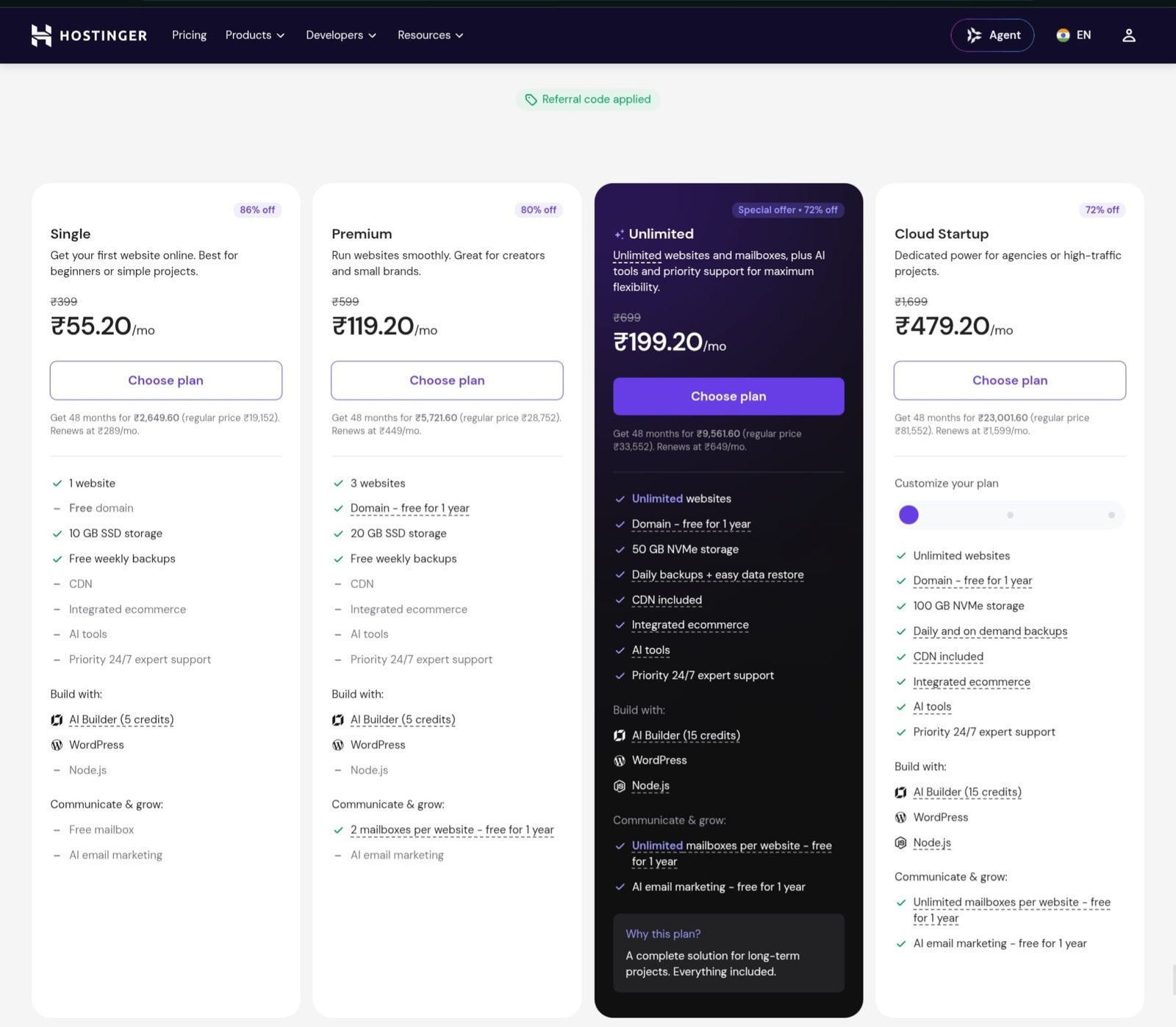
The Premium plan currently runs ₹149/month on a 48-month commitment (₹7,152 upfront), renewing at ₹449/month afterward; roughly a 3x jump. The Single plan is cheaper still at ₹69/month upfront, renewing at ₹289/month. Either way, the lowest advertised rate requires a long prepaid term; shorter terms cost noticeably more per month.
The Unlimited plan starts at ₹249/month on a 48-month commitment for unlimited websites, 50 GB NVMe storage, CDN, and priority expert support.
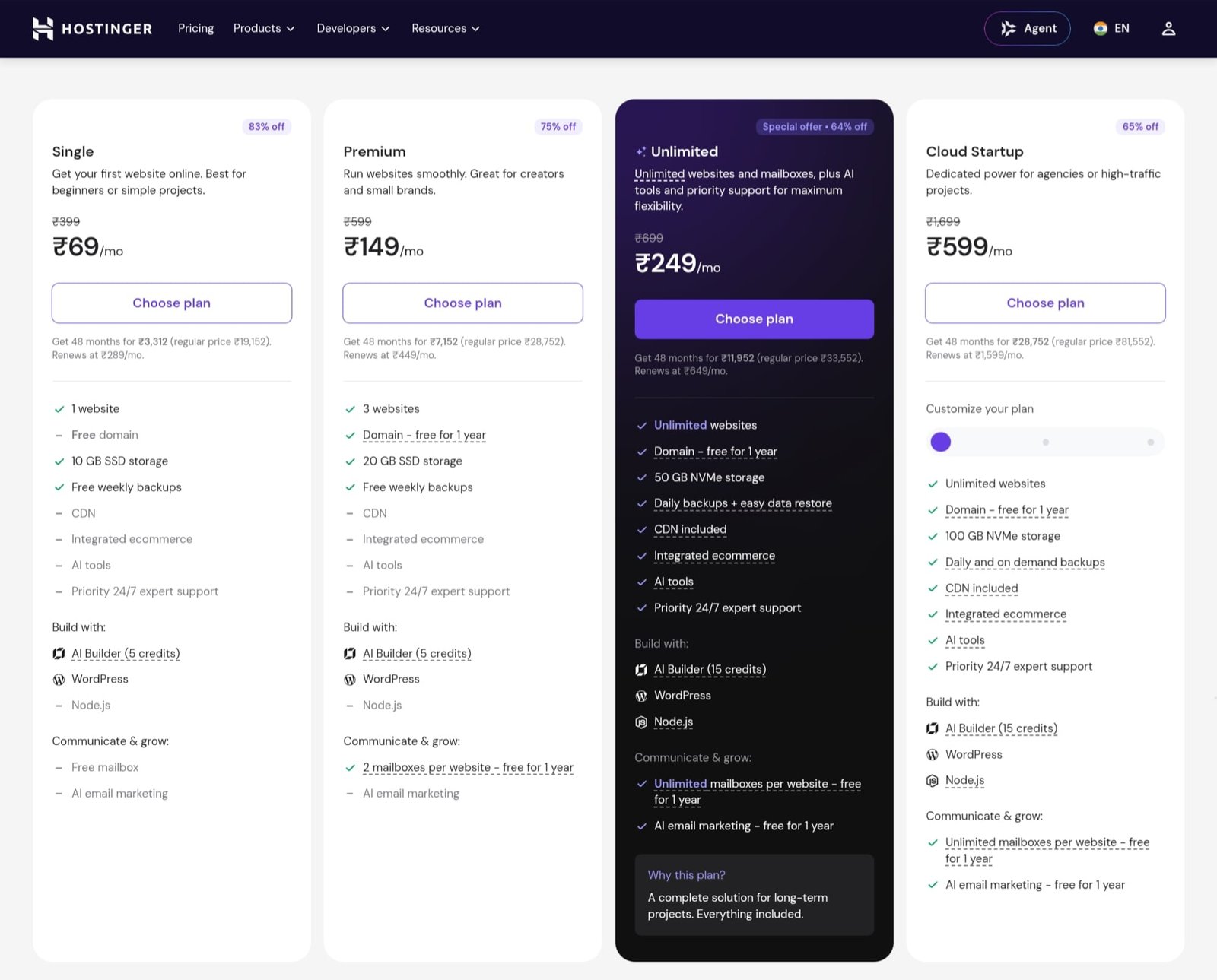
However, you will get a 20% discount on all plans by using our referral link. Use our referral link, avail a 20% discount on your hosting purchase, and kickstart your blogging journey with peace of mind.
Pros
- Genuinely strong price-to-feature ratio, especially the CDN and caching included by default
- Clean, modern dashboard that’s easier for non-technical users than cPanel
- Reasonable renewal jump compared to some competitors on this list
- Free, unlimited website migration support
Cons
- Best pricing requires a 48-month prepayment, which is a big upfront commitment for a first blog
- Entry-tier storage (10GB on Single) is limiting if you plan to publish a lot of images
Verdict for Hostinger
Hostinger earns “best overall” because it doesn’t force a trade-off between affordability and actual performance.
You get CDN, caching, and reasonable renewal pricing without stretching your budget. It’s the safest default for most Indian bloggers starting out.
2. Bluehost – Best for WordPress Blogging
Who it’s best for: Bloggers who want the reassurance of an officially WordPress.org-endorsed host and a guided setup experience, without needing to research server configuration themselves.
Key hosting features
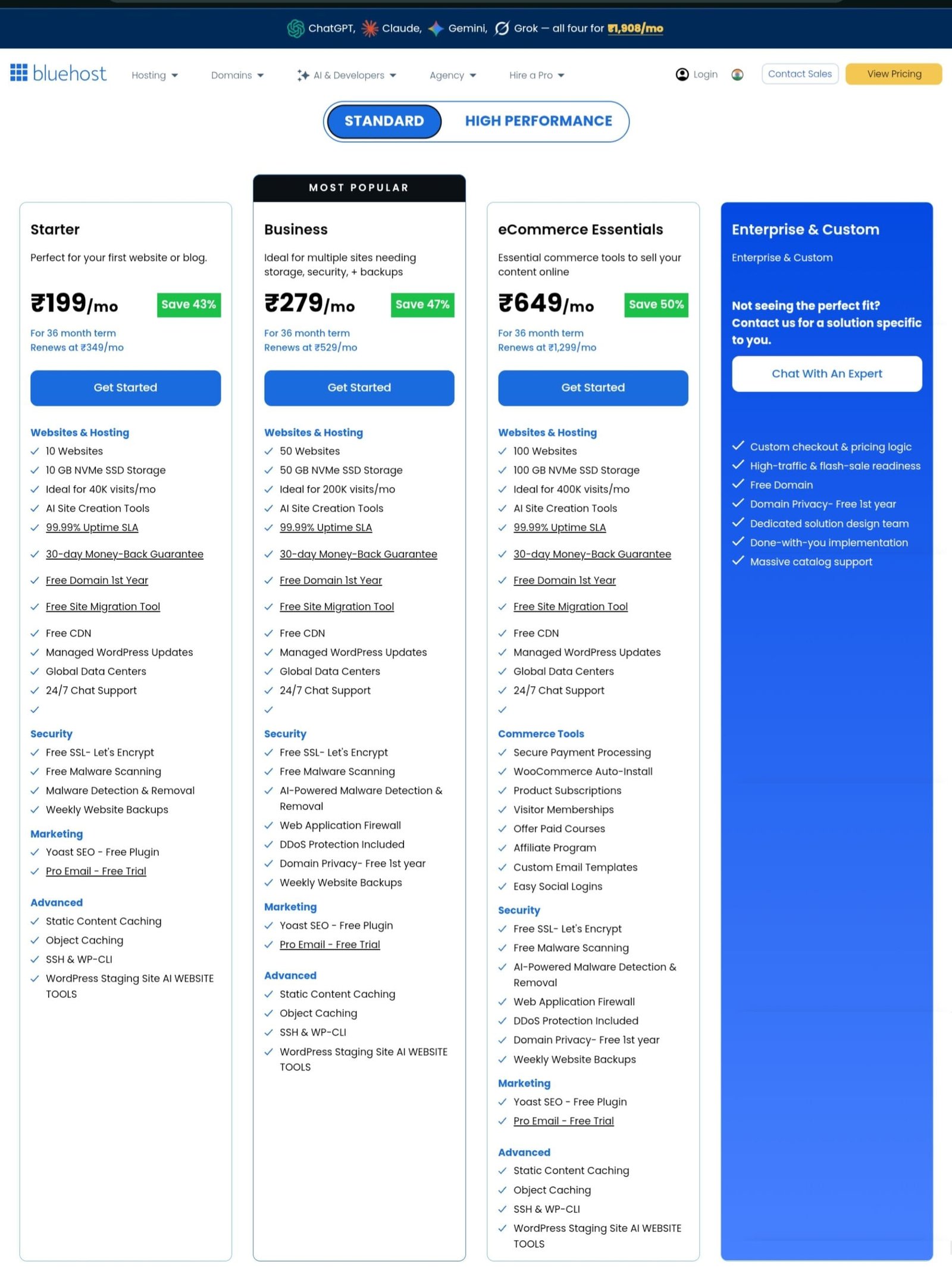
Bluehost India’s Starter shared plan includes 10GB of NVMe storage, support for up to 10 websites on the account, a free domain and SSL certificate for the first year, and a free Cloudflare CDN bundled in even at the entry tier.
Performance
Solid rather than exceptional. Bluehost doesn’t operate an India-based data center, relying instead on its CDN to reduce latency for Indian readers, and this is worth knowing if your entire audience is India-based and every millisecond of TTFB matters to you.
WordPress experience
This is where Bluehost stands out. It’s one of only two hosts officially recommended on WordPress.org, and its setup wizard (WonderSuite) walks first-time bloggers through theme selection and essential plugin setup.
This is a smoother first-time experience than most competitors offer.
Pricing and renewal considerations
The Starter plan runs approximately ₹199/month at signup, renewing at roughly ₹349/month, which is around a 1.8x increase. That’s a smaller relative jump than SiteGround or BigRock, though the absolute renewal price still lands mid-pack among the five hosts here.
Pros
- Official WordPress.org recommendation with a genuinely optimized setup flow
- Free CDN included even on the entry plan
- More moderate renewal increase (in relative terms) than several competitors
- Supports multiple websites even on the Starter tier
Cons
- No Indian data center, so raw latency depends more heavily on CDN performance
- Entry-tier storage (10GB) is on the lower side for an image-heavy blog
- Daily backups typically require an upgraded plan
Verdict for Bluehost
If a guided WordPress setup and official WordPress.org backing matter more to you than the absolute lowest price, Bluehost is the strongest pick here, particularly for bloggers who want to focus entirely on writing, not server management.
3. SiteGround – Best for Growing/High-Traffic Blogs

Who it’s best for: Bloggers who already have meaningful traffic, or affiliate and niche bloggers for whom downtime or slow load times translate directly into lost revenue.
Key hosting features
SiteGround’s entry-level StartUp plan includes 10GB of storage, support for one website, and unlimited monthly visits before you’d need to upgrade.
Every plan, including StartUp, includes daily backups, free SSL, and a CDN, along with SiteGround’s own Site Tools dashboard in place of cPanel.
Performance
This is SiteGround’s clear strength. It runs on Google Cloud infrastructure, and independent benchmarks consistently place it among the more consistent performers under traffic load, with typical page load times in the 1-2 second range during testing.
WordPress experience
Managed WordPress features, staging environments, automatic updates, and SiteGround’s own caching layer come standard rather than gated behind higher tiers, which is unusual in this price category and genuinely useful once your blog is complex enough to need staging before pushing changes live.
Also Read: Best Web Analytics Tools To Improve Your Website
Pricing and renewal considerations
SiteGround prices in USD rather than INR. The StartUp plan runs around $3.99/month at signup (roughly ₹382 at current exchange rates), but renews at $17.99/month (roughly ₹1,700); one of the steepest renewal jumps of any host in this comparison, commonly cited around 500%.
Pros
- Strong, consistent performance under traffic spikes, backed by Google Cloud infrastructure
- Daily backups included even on the entry-level plan
- Well-regarded, knowledgeable customer support
- Staging tools included standard, useful as your blog matures
Cons
- Steepest renewal price increase among the five hosts compared here
- USD pricing means your INR cost shifts with exchange rates
Verdict for SiteGround
SiteGround makes sense once your blog has outgrown “just getting started.” If traffic or revenue already depends on your site staying fast and up, the premium is often worth paying. For a brand-new blog with no traffic yet, it’s likely more than you need.
4. GoDaddy – Best for Beginners Wanting an All-in-One Platform
Who it’s best for: First-time bloggers who’d rather manage domain, hosting, and email under one familiar, widely recognized account than shop across multiple providers.
Key hosting features
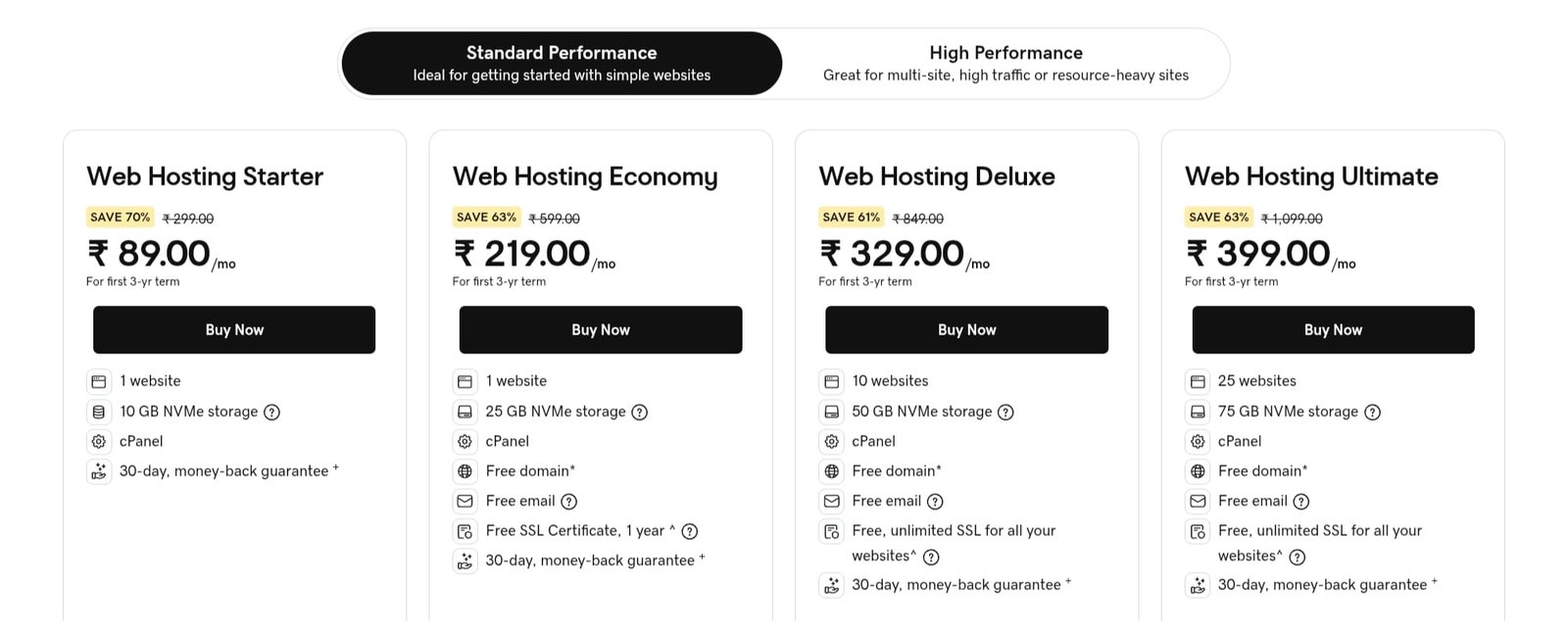
GoDaddy India’s shared hosting lineup runs from a Starter plan at roughly ₹89/month up through Economy (~₹219/month), Deluxe (~₹329/month), and Ultimate (~₹399/month) tiers.
The Economy plan, GoDaddy’s typical entry recommendation for a single site, includes around 25GB of NVMe storage, a free domain, and a free SSL certificate for the first year, all managed through the familiar cPanel interface.
Performance
Average for the category. GoDaddy doesn’t stand out on independent speed benchmarks the way Hostinger or SiteGround do, but it’s serviceable for a low-to-moderate traffic blog.
Also Read: Impact of AI in Web Design: 10 Ways AI Is Changing Web Design
WordPress experience
One-click WordPress installation works fine, but GoDaddy’s WordPress-specific optimization is less developed than Bluehost’s or Hostinger’s, as this is a host built around broad simplicity rather than deep WordPress tuning.
Pricing and renewal considerations
Entry pricing is genuinely low, but GoDaddy has a well-documented pattern of charging extra for features other hosts bundle in by default.
For instance, daily backups and CDN are often paid add-ons rather than included. Renewal pricing also increases substantially after your first term, commonly landing in the ₹700–900/month range depending on the plan and current offers, so factor add-on costs into your real monthly budget rather than the sticker price alone.
Pros
- Recognizable, well-established brand with broad support infrastructure
- Convenient if you want domain, hosting, and email under a single account
- Low, accessible entry pricing across several tiers
Cons
- Backups and CDN frequently cost extra rather than being included standard
- Average performance relative to specialized hosts in this comparison
- Renewal pricing plus add-ons can add up faster than the entry price suggests
Verdict for GoDaddy
GoDaddy is a reasonable pick if the convenience of one account for domain and hosting outweighs squeezing out maximum value per rupee.
For blogging specifically, though, you’re generally getting less included by default than with Hostinger or Bluehost at a comparable price.
5. BigRock – Best Budget Option

Who it’s best for: Bloggers on a genuinely tight starting budget, for instance, a hobby blog, a side project, or a first attempt at blogging where minimizing upfront cost matters more than performance headroom.
Key hosting features
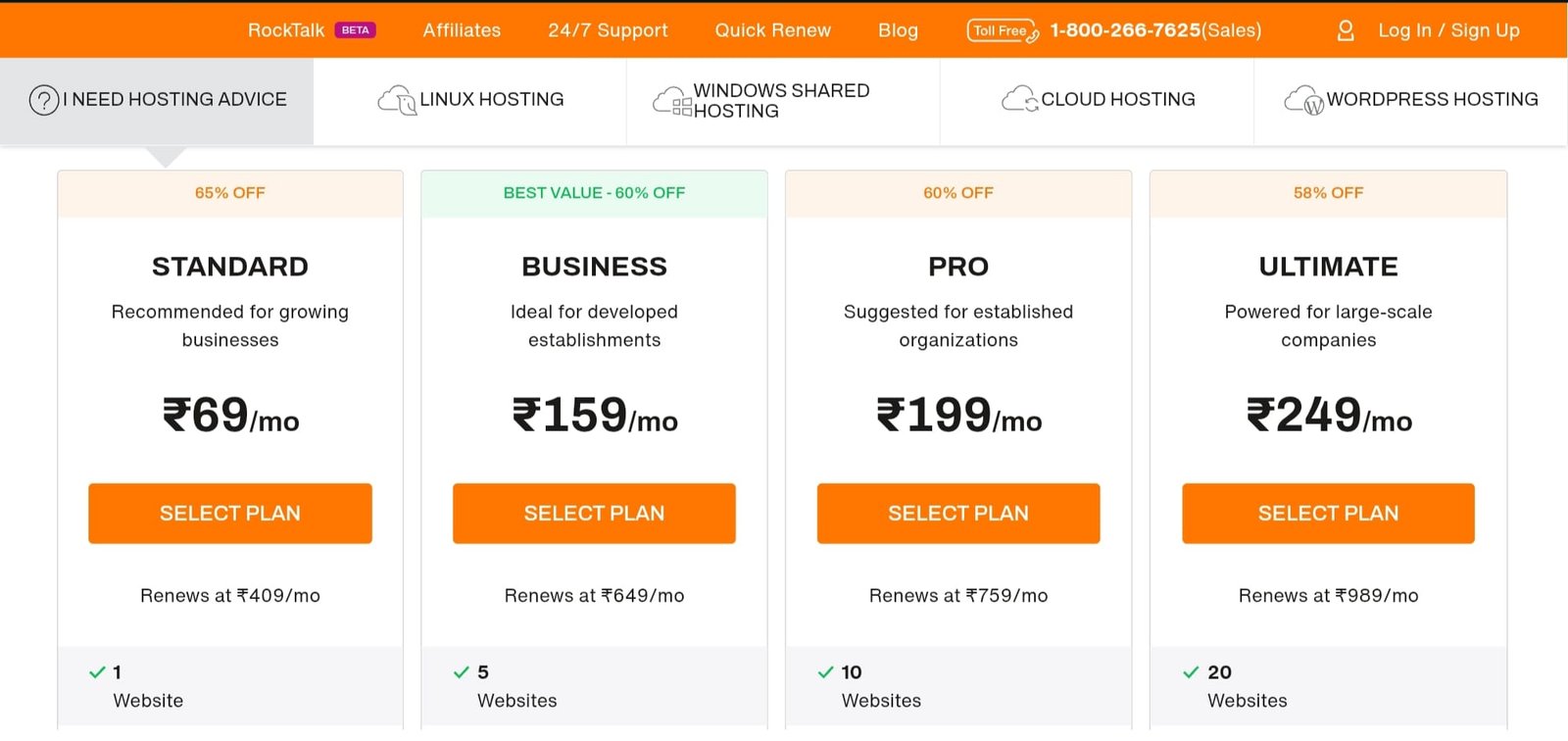
BigRock, an India-founded host now part of Newfold Digital, offers a Starter shared plan from around ₹69/month, including 20GB of storage, free SSL, cPanel access, and one-click installers. Higher tiers (Advanced, Business, Pro) step up storage and remove site limits.
Performance
BigRock’s own marketing claims sub-1-second load times and 99.99% uptime on its NVMe-backed plans, and it does maintain India-based data centers, which helps latency for a domestic audience.
That said, independent third-party benchmarks have generally placed it a step behind Hostinger and SiteGround under sustained traffic load.
This is worth weighing if your blog is aiming for serious growth rather than a first low-traffic project.
WordPress experience
WordPress installs easily through the standard one-click tools, but BigRock doesn’t offer the deeper WordPress-specific optimization layer that Bluehost or Hostinger build in.
Also Check: Best SEO Tools To Enhance Your Website Performance [Expert Picks]
Pricing and renewal considerations
This is where BigRock needs the most scrutiny. The ₹69/month entry price is real and among the lowest in this comparison, but multiple independent reviews report renewal increases in the range of 2x to over 7x the promotional rate depending on the plan and term length.
Pros
- Lowest genuine entry price among the five hosts compared here
- India-based data centers and support, with INR billing throughout
- Straightforward cPanel environment, familiar to anyone who’s used shared hosting before
Cons
- Performance benchmarks generally trail the other four providers under load
- Fewer modern conveniences (CDN, deeper caching) than competitors at a similar price point
Verdict
BigRock is a sensible choice if your only goal right now is getting a blog live as cheaply as possible. Just go in with clear eyes on renewal pricing, and calendar a reminder to review your plan before your first term ends.
Best Hosting Based on Your Blogging Needs
Everything so far has been about the providers themselves. This section flips the question around: instead of “which host is good,” it asks “which host is good for you” because those aren’t the same question, and most hosting content on the internet conveniently skips this distinction.
Best Hosting for a New Blog
What beginners actually need is smaller than most new bloggers assume: reliable uptime, a simple WordPress install, enough storage for a year or two of posts and images, and support that can talk you through problems in plain language. That’s genuinely it.
You don’t need multi-site management, staging environments, or dedicated resources on day one, and those matter once you have a live blog with something to lose, not before.
Start on the entry-level plan from Hostinger or GoDaddy; both keep the beginner tier genuinely simple and inexpensive, and upgrade only when an actual, measurable need shows up (running out of storage, traffic outgrowing shared resources).
Best Budget Hosting for Bloggers
Compare total cost rather than headline price. This is the single most important habit to build before you buy any web hosting plan in India. Every provider in this comparison advertises an eye-catching entry rate, and every one of them renews at a meaningfully higher price.
So the real question isn’t “which plan is cheapest to sign up for.” It’s “what will this cost me over 24 or 36 months, including renewal and any add-ons I’ll actually need (like daily backups or a CDN, if they’re not already included).”
BigRock wins on entry price alone; Hostinger tends to win on total cost when you actually do this math, because its renewal increase is more moderate.
Best Hosting for WordPress Blogs
WordPress-specific features that matter go well beyond “does it support WordPress;” every host in this comparison does.
What separates a genuinely good WordPress host from an adequate one is: automatic core and plugin updates handled server-side, a caching layer built for WordPress’s database-heavy structure (not just a generic cache), one-click staging so you can test changes safely, and malware scanning tuned to catch WordPress-specific vulnerabilities like outdated plugins.
Bluehost leads here as the officially WordPress.org-recommended option, with Hostinger a close second thanks to its LiteSpeed caching and AI-assisted setup built specifically around WordPress.
Best Hosting for Affiliate Blogs
Performance and traffic considerations matter more for affiliate blogging than almost any other blog type, for a simple reason: your income is directly tied to page speed.
Slow-loading pages hurt your Core Web Vitals score, which affects your Google rankings, and they also hurt your on-page conversion rate directly because a reader who bounces before your affiliate link loads never clicks it.
This is one niche where paying more for consistently fast infrastructure is a genuine investment, not just a nice-to-have.
SiteGround is the strongest fit here: its Google Cloud backbone handles traffic spikes well, and its plans scale upward without a painful migration process.
Best Hosting for Blogs Targeting Indian Visitors
Server/network considerations are where a lot of generic “best hosting” comparisons fall short, because they don’t account for where your actual readers are. If your audience is primarily in India, the physical distance data has to travel matters. A server in the US or Europe adds latency on every single request before a CDN can help. Look specifically for either an Indian data center or a host with strong CDN presence across Indian cities.
Hostinger and BigRock both operate with India-relevant infrastructure and are worth prioritizing if your entire readership is domestic; Bluehost and SiteGround rely more heavily on CDN to bridge the distance, which still performs well but has a slightly higher performance floor to close.
Best Hosting for High-Traffic Blogs
Why shared hosting may eventually become insufficient comes down to simple math: on shared hosting, you’re splitting a server’s CPU and RAM with other websites.
Below a certain traffic threshold, often somewhere in the 20,000-50,000 monthly visitor range, depending on the host, this is invisible.
Above it, pages start slowing down during peak hours, and if your posts go viral or you run a traffic-driving campaign, you can see real downtime exactly when you need uptime most.
Cloud/VPS upgrade paths are what separate hosts that scale gracefully from ones that force a disruptive migration. SiteGround‘s infrastructure is built to handle this transition well, and its higher tiers exist specifically for blogs outgrowing shared hosting.
Hostinger and Bluehost also offer VPS options, but check specifically whether upgrading keeps your site on the same account and infrastructure family.
A same-provider upgrade is far less risky than switching hosts entirely once your blog already has traffic and revenue on the line.
FAQs
Which is the best web hosting for blogging in India?
Hostinger offers the strongest overall balance of speed, affordability, and reasonable renewal pricing for most Indian bloggers, though beginners, WordPress purists, and high-traffic sites may prefer different picks above.
Is Hostinger good for blogging in India?
Yes, it delivers solid performance with built-in CDN and caching, competitive pricing with a moderate renewal jump, easy WordPress setup, and a straightforward upgrade path as your blog’s traffic grows.
How much does it cost to host a blog in India?
Expect roughly ₹70-350/month at signup on shared hosting, renewing at ₹300-1,000+/month, plus domain renewal (₹800-1,500/year) and optional backup, CDN, or security add-ons.
Is shared hosting enough for a blog?
Yes, for most new and mid-traffic blogs, typically up to 20,000-50,000 monthly visitors. Beyond that, shared resources get strained, and a cloud or VPS upgrade becomes worthwhile.
Which hosting is best for a beginner blogger?
Hostinger or GoDaddy, both offer simple dashboards, low entry pricing, guided WordPress setup, and accessible support, minimizing the technical learning curve for someone just starting out.
Is WordPress hosting better than regular web hosting?
WordPress hosting is regular hosting tuned specifically for WordPress, which includes faster PHP handling, automatic updates, and built-in caching, genuinely worth it if WordPress is your platform.
Should Indian bloggers choose a server located in India?
Ideally yes, since physical proximity reduces latency for Indian readers; a strong CDN can substantially close this gap if your host’s servers are located abroad instead.
When should I upgrade my blog hosting?
Upgrade when you notice slower load times during peak hours, approach 20,000-50,000 monthly visitors, or regularly hit storage limits. Don’t wait until your site actually goes down.
Final Verdict: Which Web Hosting Should You Choose?
Stop trying to find the “best” host because it doesn’t exist. What exists is the right host for the blog you have right now, not the one you’re imagining in your head six months from now.
New blogger? Hostinger. Chasing affiliate income? SiteGround. Married to WordPress? Bluehost. Broke and just testing the waters? BigRock, eyes open on renewal pricing.
One thing to remember is that hosting has never been the reason your blog fails. Inconsistency is. Pick a plan from this list, commit to it, and go write your first post today. The server was never the hard part.
Related Articles
12 Powerful Benefits of WordPress That Make It the #1 CMS
Best Form Builders for WordPress in (Expert Guide)
Best Website Builders for Beginners
How to Improve Website User Experience: 12 Proven Optimization Tips

TechnicalStudies was started by Neeladrinath with one simple idea — give Indian students a reliable place to figure out what’s actually worth their time and money. Every recommendation here is backed by careful research, real student feedback, and honest analysis. We cover online courses, laptops, smartwatches, software deals, and learning resources — all looked at from a student’s perspective, so you can spend less time guessing and more time learning.