
Last updated on July 3rd, 2026 at 07:31 pm
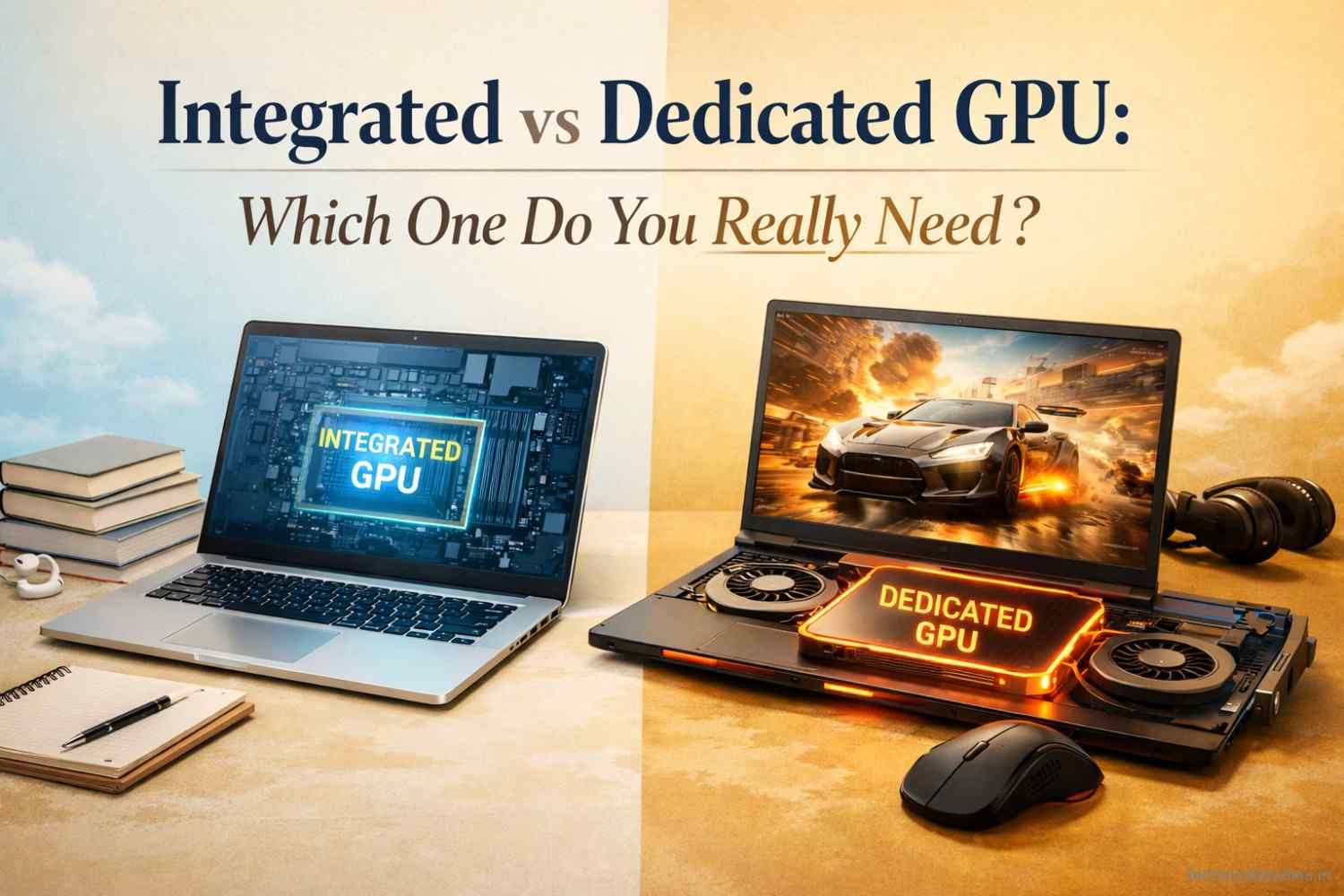
Confused between integrated vs dedicated GPU? Learn which one you actually need based on gaming, editing, and daily use, avoid overspending, and choose the right laptop GPU smartly.
Let me be honest with you, I’ve seen people drop ₹40,000 on a dedicated GPU for a laptop they mostly use to write emails and watch YouTube.
The GPU sat there, hot and hungry, draining the battery in three hours flat, solving a problem that never existed.
This is more common than you’d think.
Walk into any electronics store, or worse, fall into a spec-comparison rabbit hole online, and you’ll quickly notice that “more” is always being sold as “better.” More cores. More VRAM. More watts.
The marketing is loud, the numbers are impressive, and before you know it, you’re convinced your next machine needs a dedicated GPU because it just sounds right.
But here is what nobody tells you clearly: for a huge chunk of users, an integrated GPU is good enough, or I can say it is a smart choice to go with.
On the other hand, a dedicated GPU is a must-have for another set of users.
So instead of asking which GPU is more powerful, you should ask which GPU you actually need.
This will help you choose the perfect GPU for your laptop.
In this article, we will discuss integrated vs dedicated GPUs and help you figure out which GPU is the right choice for your work.
You will learn the actual difference between these two GPU kinds in day-to-day use, and by the end, you will understand whether an integrated or dedicated GPU is right for you.
What is an Integrated GPU?
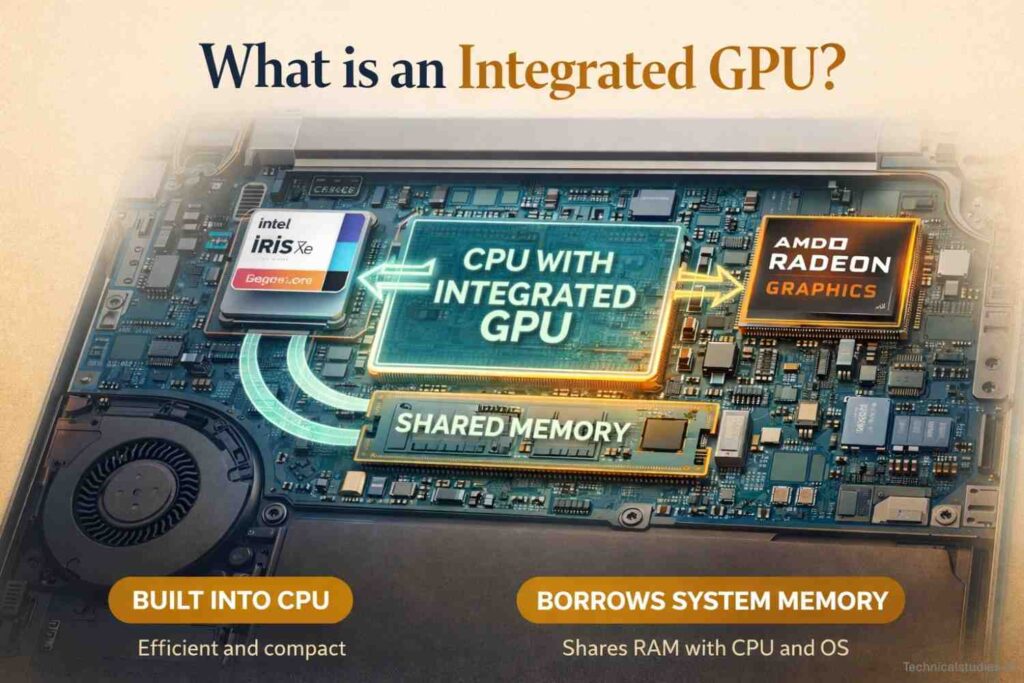
Think of an integrated GPU as the graphics muscle that came free with your processor. It’s built directly into the same chip as your CPU, no separate card, no dedicated slot, no extra power plug.
It just lives there, quietly handling everything visual that shows up on your screen.
This compactness comes with some limitations. For instance, it doesn’t have its own memory. It uses your laptop’s RAM for all your graphics-intensive tasks.
Most thin Intel laptops today have Intel’s Iris Xe integrated graphics. AMD ships Radeon integrated graphics inside their Ryzen processors, and honestly, the newer ones have gotten surprisingly capable.
Apple’s M-series chips take this further than anyone; their integrated GPU shares memory so efficiently that it genuinely blurs the line between “integrated” and “real” graphics performance.
Also Read: Best Laptops For Writers and Bloggers in India
Where the integrated GPU genuinely shines.
The main reason for using integrated graphics in laptops is efficiency. A machine that uses an integrated GPU stretches the battery charge, allowing you to work long hours unplugged.
It also helps make the laptop thin and light and keeps the machine cool and quiet.
For everyday uses like web browsing, documents, video calls, coding, and even casual photo editing, it is perfect, and you won’t feel any lag in your experience.
The main advantage of an integrated GPU is that it comes with the chip, so you are not paying extra for it. Also, there is no need to look for better RAM and faster storage.
Where does an integrated GPU run out of road?
Here comes the trade-off of having an integrated GPU. An integrated GPU has a ceiling, and it’s not that high.
Ask it to run a modern AAA game at decent settings, and it’ll struggle, have low frame rates, stuttering, or just flat-out refuse to cooperate.
Throw a 4K editing timeline at it, and you’ll be watching a lot of buffering spinners. Start running AI models locally, and it’ll tell you, in its own quiet way, that this isn’t what it signed up for.
It’s not a flaw. It’s just physics. Shared memory, lower bandwidth, and a fraction of the compute cores mean there’s only so much it can do before it hits a wall.
The key is knowing where that wall is, and whether your work ever gets close to it.
Also Read: Best Laptops for Business Use in India
What is a Dedicated GPU?
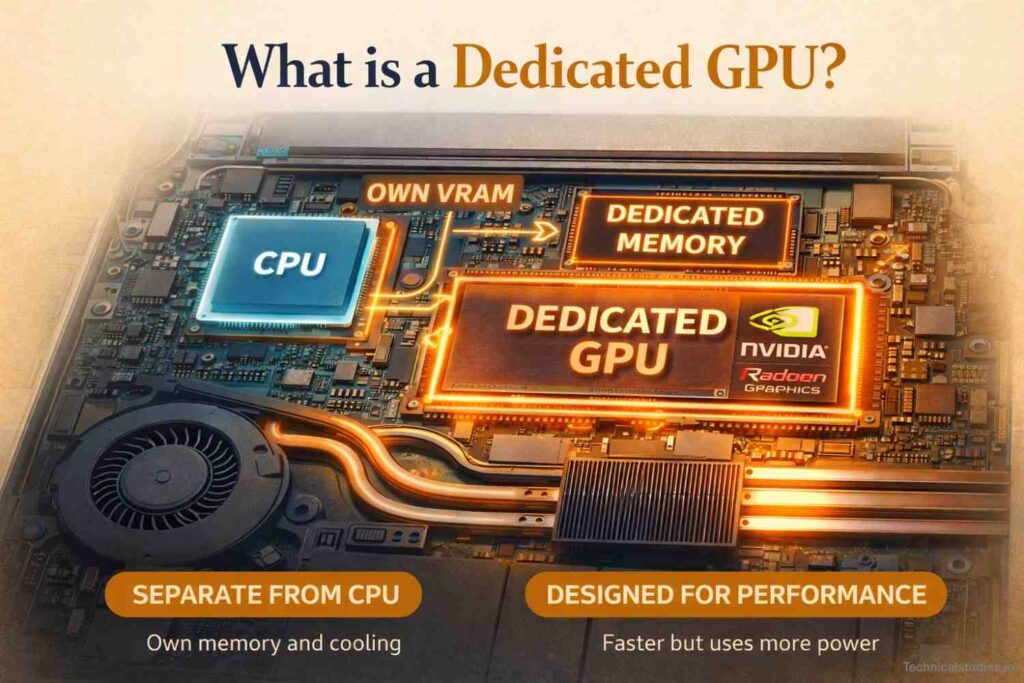
A dedicated GPU is a separate piece of hardware entirely. It has its own processor, its own high-speed memory (called VRAM), and its own power supply chain.
It doesn’t share anything with your CPU. It’s not borrowing RAM from your system. It’s its own self-contained graphics engine sitting alongside everything else inside your machine.
That independence is exactly what makes it powerful, and exactly what makes it expensive.
You’ll recognise the names. NVIDIA’s RTX series is everywhere, the RTX 4060, 4070, 4090, each one progressively more capable (and progressively more wallet-destroying).
On the AMD side, the Radeon RX lineup competes hard, especially at mid-range price points. These aren’t incremental upgrades over integrated graphics. They’re a different category of hardware doing a fundamentally different job.
Also Read: What Makes a Laptop Really Fast? – CPU, GPU, RAM, or Storage
Where a dedicated GPU is worthwhile
When you use a dedicated GPU for demanding tasks, you will see the difference immediately. Whether you game at 1440p or 4K, a dedicated GPU can handle that.
Loading a 4K timeline in Premiere Pro or DaVinci Resolve? The VRAM means you’re actually editing, not waiting. Running a local LLM or training a model?
VRAM is practically the only thing that matters, and dedicated GPUs have it in abundance, 8GB, 12GB, 16GB, even 24GB on the high-end cards.
For creative professionals, gamers, and anyone running GPU-heavy workloads, it’s not a luxury. It’s a requirement.
What you’re actually paying for — and giving up
None of this comes free. A decent dedicated GPU in a laptop adds anywhere from ₹15,000 to ₹60,000+ to the price, depending on the tier.
On a desktop, a mid-range card alone can cost more than some entire laptops. That’s before you account for the power supply, cooling, and chassis needed to support it.
Then there’s the heat. Dedicated GPUs under load get hot. Laptop fans spin up loud.
If airflow is not managed well, you will experience thermal throttling in laptops with dedicated GPUs.
Desktop setups need proper cases and cooling solutions. It’s a whole ecosystem that comes with the territory.
Battery life is also affected. A laptop with a dedicated GPU running under load can go from full to empty in under two hours. Even at idle, just having the GPU present increases baseline power draw.
Manufacturers have gotten smarter about this; most modern laptops automatically switch between integrated and dedicated graphics depending on the task, but it’s still a meaningful difference day to day.
That said, if what a dedicated GPU gives is worth it for what it asks for, you are making a wise investment.
Also Read: Best Laptops For Video Editing In India – Power, Performance & Precision
Integrated vs Dedicated GPU — Quick Comparison
Before we get into the “which one should you actually buy” territory, here’s the honest side-by-side. No fluff, no marketing spin, just what actually differs between the two when you put them next to each other.
| Feature | Integrated GPU | Dedicated GPU |
|---|---|---|
| Performance | Moderate | High |
| Price | Budget-friendly | Expensive |
| Battery life | Excellent | Lower |
| Heat | Low | High |
| Best for | Students, casual users | Gamers, creators |
Let me explain the difference in the context that actually matters.
The main difference you will see is the performance, which is moderate vs high. You can’t notice the huge difference in everyday tasks. With GPU-intensive tasks, the difference is really noticeable.
It is obvious that a laptop with a dedicated GPU will cost more than a laptop with integrated graphics. So the selection criteria should depend on what you actually need.
I think battery life is a crucial factor that is the most underrated one. With integrated graphics, the battery doesn’t drain fast and lasts up to a full day. This is what actually makes a difference during everyday use.
Heat matters more on laptops than people realise. A hot machine is an uncomfortable machine — literally, if it’s on your lap. It’s also a throttled machine, meaning performance dips under sustained load.
Dedicated GPUs run hotter by nature, and how well a laptop manages that heat varies wildly by build quality.
Real-Life Use Cases — Which GPU Do You Need?
Real-life performance is what actually matters in a laptop. Specs are just numbers until you see how the laptop performs.
Let’s discuss whether you need an integrated or dedicated GPU based on what you do.
Students & Office Users
If you belong to this category, you use a laptop for Google Docs, browsing the internet, Notion, Zoom calls, and occasional entertainment. Let me tell you the truth: you don’t need a dedicated GPU.
The above list of activities is dependent on CPU and RAM. GPU is barely used. So a laptop with integrated graphics like Intel Iris Xe, AMD Radeon on a Ryzen chip, or Apple’s M-series will fulfill your needs.
Also Read: Best Laptops for Students in India
Casual vs Serious Gamers
This one depends entirely on what you’re playing and how you want to play it.
If you are playing Minecraft, Stardew Valley, indie titles, older games, or anything that isn’t pushing cutting-edge graphics, modern integrated GPUs can handle this efficiently.
At 1080p, medium-to-low settings, casual gaming on integrated graphics is a real option today in a way it simply wasn’t five years ago.
But the moment you step into AAA territory, think Cyberpunk 2077, Alan Wake 2, anything with ray tracing or a recommended spec sheet that reads like a hardware wish list, integrated graphics will not cut it.
You won’t just get low frame rates. You’ll get stuttering, crashes, and the distinct feeling that your machine is apologizing to you in real time.
For serious gaming, a dedicated GPU isn’t a nice-to-have. It’s the entry ticket. The only real question is which tier, and that depends on your resolution and frame rate expectations.
Also Read: Best Laptops For Gamers In India
Video Editors & Creators
If you’re cutting together vlogs, short-form content, or social media clips at 1080p in something like CapCut or even Premiere Rush, a capable integrated GPU, especially Apple’s M-series, can get you surprisingly far.
The M3 and M4 chips in particular have hardware media engines that handle H.264 and HEVC encoding natively. Light editing on integrated graphics is no longer the painful experience it once was.
But the moment you’re working with 4K RAW footage, multi-cam timelines, heavy colour grading in DaVinci Resolve, or stacking effects and transitions, you will feel the ceiling.
VRAM becomes the critical variable. Without enough of it, the software starts leaning on system RAM, playback gets choppy, and export times stretch from minutes into “I’ll check back after lunch.”
For serious creative work, a dedicated GPU with at least 8GB of VRAM is where I’d start. It’s the difference between your editing software working with you and constantly making you wait.
Programmers & Developers
Most developers I know are running on integrated graphics and doing just fine, and that’s completely correct.
Writing code, running local servers, debugging, working with Docker containers, and managing databases, none of it is GPU work. Your CPU, RAM, and SSD speed matter infinitely more to your development experience than your graphics chip.
Where the exception kicks in is specific and significant. If you’re working in AI and machine learning, training models, running inference locally, working with frameworks like PyTorch or TensorFlow, VRAM is everything.
A dedicated GPU with 8GB+ isn’t optional; it’s what makes local development feasible versus spending all day waiting for results.
Game development is the other clear exception. You’re building and rendering 3D environments in Unreal or Unity, the dedicated GPU is part of your development workflow, not just your playtesting setup.
And then there’s simulation work: physics engines, scientific computing, anything that parallelises heavily. If your code is designed to run on the GPU, you obviously need a GPU worth running it on.
For everyone else writing Python, JavaScript, Go, or anything in between, save the money. Integrated graphics and a fast processor will serve you better than a mid-range dedicated GPU ever could.
Also Read: Best Laptops For Coding in India
Performance Reality — Myths vs Truth
Let me address something that quietly costs people a lot of money: the assumption that dedicated always means better. It sounds logical.
More hardware, more performance, better experience. Except that’s not how it works, and the gap between perception and reality here is wider than most people realise.
The myth: a dedicated GPU is always the superior choice
This one is persistent because it’s almost true. In raw, isolated performance benchmarks, yes, a dedicated GPU will outperform an integrated one. Every time. No argument there.
But benchmarks don’t use laptops. People do.
If your work doesn’t engage the GPU, having a dedicated one doesn’t make your work faster. Instead, it makes your laptop hotter, noisier, and drains the battery fast.
It is like paying for hardware that sits idle in the machine, draws power, and increases heat.
The truth: modern integrated GPUs are genuinely impressive now
Over the past few years, integrated GPUs have undergone a quiet revolution, and you need to know this.
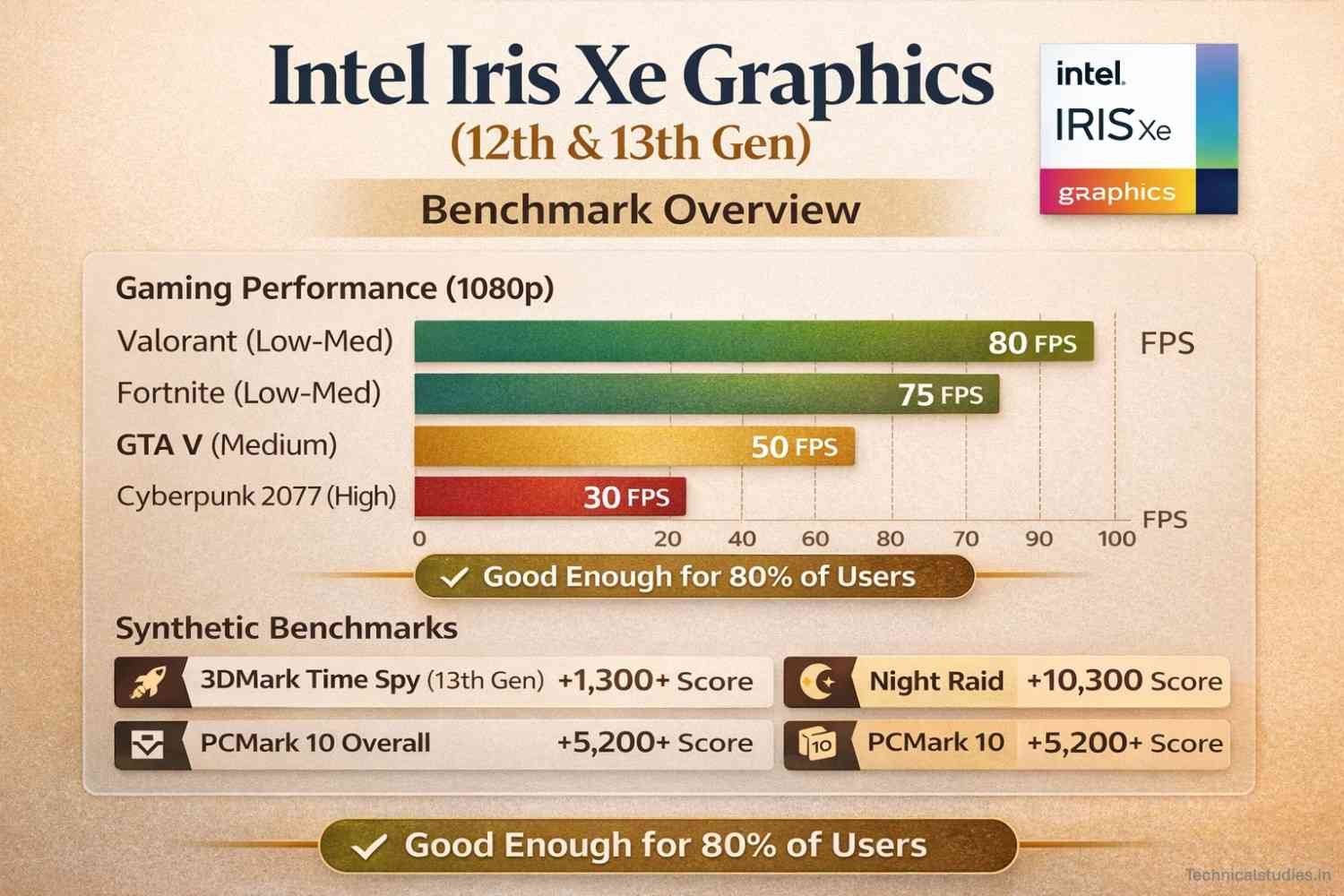
Intel’s Iris Xe graphics, shipped inside 12th and 13th gen Core processors, can handle 1080p gaming at playable frame rates on titles that would’ve laughed at integrated chips five years ago.
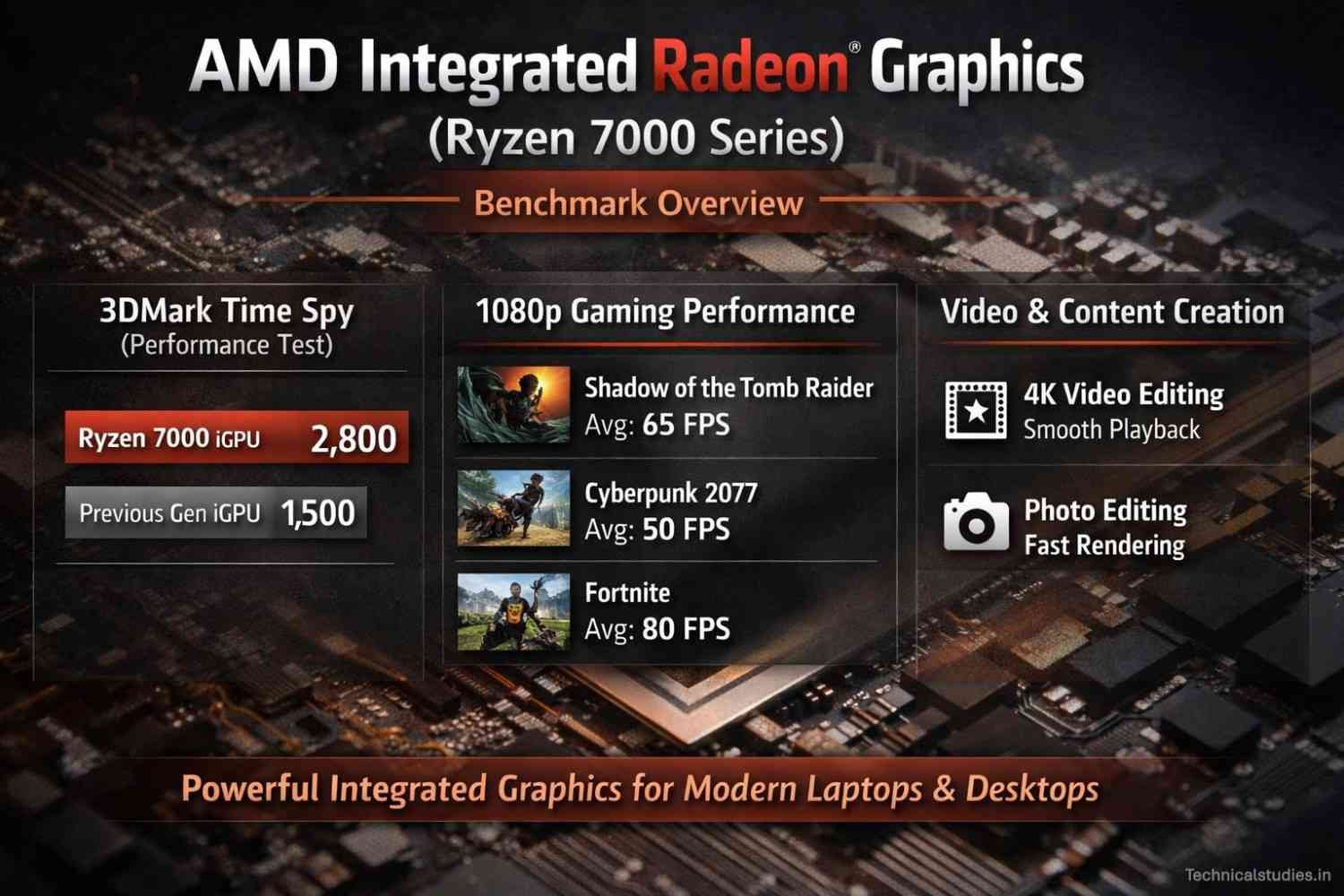
AMD’s integrated Radeon graphics inside the Ryzen 7000 series push that further; in some benchmarks, they’re genuinely competitive with entry-level dedicated GPUs from just a generation back.
And then there’s Apple. The M-series chips, M2, M3, M4, don’t even feel like “integrated graphics” in the traditional sense anymore.
The unified memory architecture means the GPU isn’t borrowing leftover RAM; it’s accessing a shared, high-bandwidth pool designed for exactly this.
The M3 Pro can handle video editing, light 3D work, and creative tasks that previously required a dedicated chip without question.
Battery Life, Heat & Portability — The Hidden Cost of Raw Power
Battery life, heat, and portability are not the glamorous specs to consider; they are the actual parameters that shape your experience with a machine every single day.
Until you are stuck in an airport with a dying laptop and no charger in sight, or use a portable gaming laptop on your lap, you might not understand this point.
Let’s talk about how it feels when you carry a laptop in the real world.
Also Read: Battery Life in Gaming Laptops: Myths, Facts & Real Numbers
Integrated GPU: the quiet, all-day workhorse
Having integrated graphics actually gives you freedom. You don’t have to look for a charging point after a few hours of working or worry about carrying a giant charger in the bag.
A well-built laptop running integrated graphics can genuinely last 8 to 14 hours in real use.
They use less power, which means less heat is produced, so the machine doesn’t get louder. Even modern ultrabooks come with no fan design that sits silently on the desk.
Dedicated GPU: serious power, serious consequences
I think the reality of owning a laptop with a dedicated GPU is managing a small thermal and electrical system every time you use it under load.
Battery life takes the most visible hit. A mid-range gaming laptop with an RTX 4060 running a demanding game can drain from 100% to empty in under two hours.
Even at idle, just browsing, no GPU load, the baseline power draw is higher because the dedicated GPU is present and drawing standby power.
Heat is the other constant companion. Dedicated GPUs under load generate serious thermal output.
Laptop manufacturers manage this through heat pipes, copper vapour chambers, and aggressive fan curves, which is engineering-speak for “the fans will be loud, and the bottom of the machine will get hot.”
Frequently Asked Questions
Can I do video editing with an integrated GPU?
Light editing at 1080p, yes, absolutely. Modern integrated chips, especially Apple’s M-series, handle it better than most people expect. But the moment you’re working with 4K RAW footage, stacking effects, or doing serious colour grading, you’ll hit a wall fast. VRAM matters more than most editors realise until they don’t have enough of it.
Is an integrated GPU good enough for gaming in 2026?
For casual and older titles, genuinely yes. AMD’s Ryzen iGPUs and Apple M-series chips have quietly closed the gap on light gaming in a way that would’ve been unthinkable five years ago.
Which is better for programming — integrated or dedicated GPU?
For most programming, integrated graphics is completely sufficient and honestly the smarter choice. Writing code, running local servers, building APIs, and frontend development, none of it meaningfully engages the GPU. The exception is specific and clear: machine learning, game development, and GPU-accelerated computing. Outside those domains, invest your budget in RAM and storage instead. You’ll feel those upgrades far more.
How much VRAM do I actually need?
It depends entirely on what you’re doing. Casual gaming at 1080p: 6GB is workable, 8GB is comfortable. 4K gaming or serious video editing: 8GB minimum, 12GB recommended. Running local AI models or LLMs: 8GB to start, 16GB if you’re working with anything beyond small models. More VRAM means less bottlenecking, smoother workflows, and longer relevance before the card starts struggling.
Final Thoughts
We have covered a lot of ground: definitions, comparisons, real-world use cases, myths, pricing, and FAQs.
But if I’m being honest, this entire article comes down to one idea: that the best GPU isn’t the most powerful one. It’s the one that matches how you actually live and work.
Strip away the marketing, the benchmark wars, the forum arguments about which GPU tier is worth it, and the decision is actually straightforward.
Do you regularly run workloads that demand dedicated GPU power? Get one. Choose the tier that fits your specific use case, not the highest one your budget can theoretically reach.
Do you not? Don’t get one. Take that budget and put it toward something that will genuinely improve your daily experience, more RAM, better storage, a higher-quality display, or simply keeping more money in your pocket.
More Articles
How Much RAM Do You Really Need in a Laptop Today? A Practical Guide for Every User
Don’t Buy a Laptop Until You Read This (Intel vs AMD Truth)
The Role of NPUs in Laptops – Everything You Need to Know
Best Gaming Laptops Under ₹1 Lakh in India (RTX 4050 & RTX 4060 Picks)

Kanha is a electronics engineer, tech enthusiast, and writer at technicalstudies.in. His experience in tech, coupled with excellent writing skills, makes the text easy to understand and helps the reader make the correct decision. Outside of writing, Kanha is passionate about exploring new gadgets and gaming.