

If you’re managing more than one social account, you already know the drill: writing captions, resizing images for five different platforms, hunting for the right posting time, then doing it all over again next week. It’s repetitive, and it eats hours you don’t have.
So when a lifetime deal shows up on AppSumo promising to fix all that for a fraction of the usual subscription cost, it’s tempting to just buy it. But a cheap deal isn’t automatically a good deal. Not every tool solves the same problem.
Some are built for scheduling and nothing else. Others lean into analytics, AI caption writing, engagement and inbox management, or niche platforms like Pinterest and LinkedIn. A few are built specifically for agencies juggling multiple client accounts.
The cheapest tool isn’t necessarily the one that saves you the most time.
That’s the lens this guide uses. Instead of ranking AppSumo’s social media tools by discount size, we’re evaluating them by what they actually help you accomplish.
So, you end up paying once for something you’ll still be using a year from now, not something collecting dust in your dashboard.
Best Social Media Management Tools on AppSumo at a Glance
Before we go deep into each tool, here’s the quick-scan version. Match your actual job-to-be-done to a tool below, then jump to that section for the full breakdown.
| Tool | Best for | Platforms | Key strength | Deal type | Our verdict |
|---|---|---|---|---|---|
| SocialBu | Multi-platform scheduling & inbox | 12+ (FB, IG, LinkedIn, TikTok, YouTube, X) | All-in-one Buffer/Hootsuite alternative | Lifetime, 4 tiers ($49–$449) | The most complete general-purpose pick |
| Linke | Bio links & click tracking | Any platform via bio link | Retargeting pixels + down-link alerts | Lifetime, single tier ($49) | Pairs well with a scheduler, isn’t one itself |
| Pin Generator | Automated Pinterest pin creation | AI-generated, on-brand pins at scale | Lifetime, 3 tiers ($99–$297) | Best if Pinterest traffic is a real growth channel | |
| Pinflux | Pinterest growth & auto-engagement | Auto-follow, repin, keyword discovery | Lifetime, single tier ($99) | Complements a pin-creation tool, doesn’t replace one | |
| BizReply | Social listening & engagement | All 8 major platforms | AI-drafted replies + client reports | Lifetime, 3 tiers ($69–$289) | Strong agency fit; requires your own AI API key |
| ViralSky | AI-powered viral content creation | X, Facebook, Threads, LinkedIn | Templates trained on 500M+ viral views | Lifetime, 3 tiers ($49–$199) | Solves content volume, not scheduling |
| Yorby | AI UGC video & competitor research | Instagram, TikTok, YouTube | Competitor spy tool + viral remix | Lifetime, 5 tiers ($69–$899) | Newer product, thinner review history |
| Latitude | LinkedIn-only publishing | Hook scoring + voice-matched drafting | Lifetime, 3 tiers ($69–$349) | Best if LinkedIn is your one serious channel |
Our Picks: Best Social Media Management Tools on AppSumo
1. SocialBu – Best All-in-One Alternative to Buffer/Hootsuite

What it does
SocialBu is the closest thing on this list to a true Buffer or Hootsuite replacement; a single dashboard to schedule, publish, analyze, and manage a unified inbox across 12+ social platforms, with automation and multi-brand workspaces built in.
Who should use it
Marketing teams and agencies managing several brands or client accounts who need one command center instead of stitching together separate tools for scheduling, analytics, and engagement.
Key features
- Drag-and-drop content calendar with evergreen content recycling
- Bulk CSV import to queue weeks of posts at once
- Unified social inbox and smart-reply automations
- Multi-brand workspaces with team roles and permissions
- Built-in analytics comparing performance across platforms
- Content curation and keyword/trend tracking to find share-worthy posts
- AI writer credits and an MCP server for connecting AI assistants like Claude
Supported platforms
12+ networks, including Facebook, Instagram, LinkedIn, TikTok, YouTube, and X.
AppSumo pricing/deal
Four lifetime tiers – $49 (10 accounts, 600 posts/month), $109 (25 accounts, 1,500 posts/month), $279 (75 accounts, 5,000 posts/month), and $449 (75 accounts, 12,000 posts/month). Higher tiers unlock social inbox, automations, and multi-brand management. 60-day money-back guarantee.
Biggest advantage
It genuinely covers the full workflow, including scheduling, listening, replying, and reporting, without needing a second tool bolted on, which is rare at this price point.
Biggest limitation
The entry tier ($49) locks out automations and the social inbox entirely, so agencies will likely need to budget for at least Tier 2 to get the features that make SocialBu worth choosing over a single-purpose tool.
2. Linke – Best Overall for Bio Links & Traffic Intelligence

What it does
Linke isn’t a scheduler; it’s a link-in-bio and short-link platform that turns your one “link in bio” slot into a full traffic hub, with analytics, retargeting, and alerts baked in.
Who should use it
Solo founders and marketing teams who drive traffic from Instagram, TikTok, or Twitter bios and want to know exactly where clicks go, not just create pretty landing pages.
Key features
- Unlimited short links and bio pages
- Real-time “buzz” alerts via SMS/email when a link’s traffic spikes
- Dead-link monitoring (alerts you if the destination URL breaks)
- Unlimited custom domains and retargeting pixels
- Traffic filters by country, OS, and browser
- Full analytics: clicks, referrals, countries, devices
Supported platforms
Works across any platform where you share a bio link – Instagram, TikTok, YouTube, Twitter/X – plus RSS and feed-wall embeds.
AppSumo pricing/deal
One-time payment of $49 (listed against a $2,999 value), lifetime access, 60-day money-back guarantee.
Biggest advantage
The retargeting pixels and down-link alerts go well beyond what Linktree or Bitly offer at this price.
Biggest limitation
It’s not a scheduling or publishing tool, so pair it with a dedicated scheduler if that’s what you actually need.
3. Pin Generator – Best for Automated Pinterest Marketing
What it does
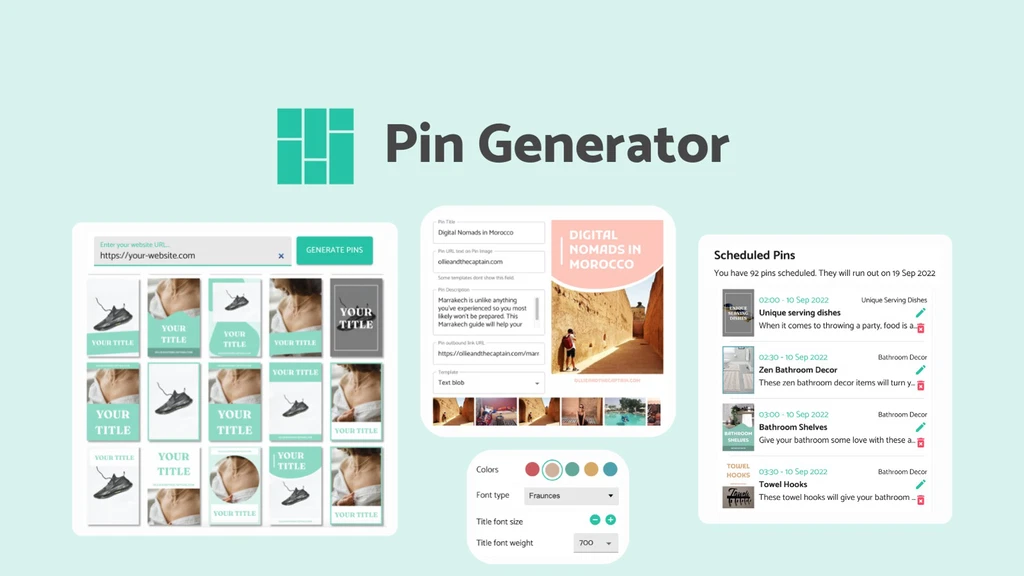
Pin Generator is a niche-specific automation tool that turns your website, blog, or store into a hands-off Pinterest pinning machine.
Connect a content source, and AI designs the images, writes SEO’d titles, descriptions, and alt text, picks the right boards, and publishes pins on a recurring schedule, no manual pin creation required.
Who should use it
Bloggers, ecommerce sellers, and affiliate marketers who rely on Pinterest as a traffic channel but don’t have hours to spend designing and posting pins every week.
Key features
- Weekly or 4-weekly automated pin batches, unlimited pins per day
- AI-generated pin images (Nano Banana 2) matched to a learned brand profile
- Auto-writes titles, descriptions, alt text, and keywords for Pinterest SEO
- Pulls fresh content automatically from your sitemap, Shopify, Etsy, WooCommerce, or RSS feed
- Bulk edit and bulk schedule for hands-on campaigns
Supported platforms
Pinterest only, with integrations for Shopify, Etsy, WooCommerce, WordPress, and Amazon as content sources.
AppSumo pricing/deal
Plans start at $99 for one code (down from $204); the 3-code tier runs $297 and includes 3,000 pin credits/month for life, unlimited linked Pinterest profiles, and full ecommerce integrations. 60-day money-back guarantee, and this deal is stackable.
Biggest advantage
It solves a very specific, high-effort problem – the founder claims a 50-hour-a-month workflow shrinks to 2-4 hours – which is hard to match with a general-purpose scheduler.
Biggest limitation
It’s Pinterest-only. If you need a single dashboard for Instagram, LinkedIn, and Twitter too, this only covers one piece of your stack.
4. BizReply – Best for Social Listening & Engagement
What it does
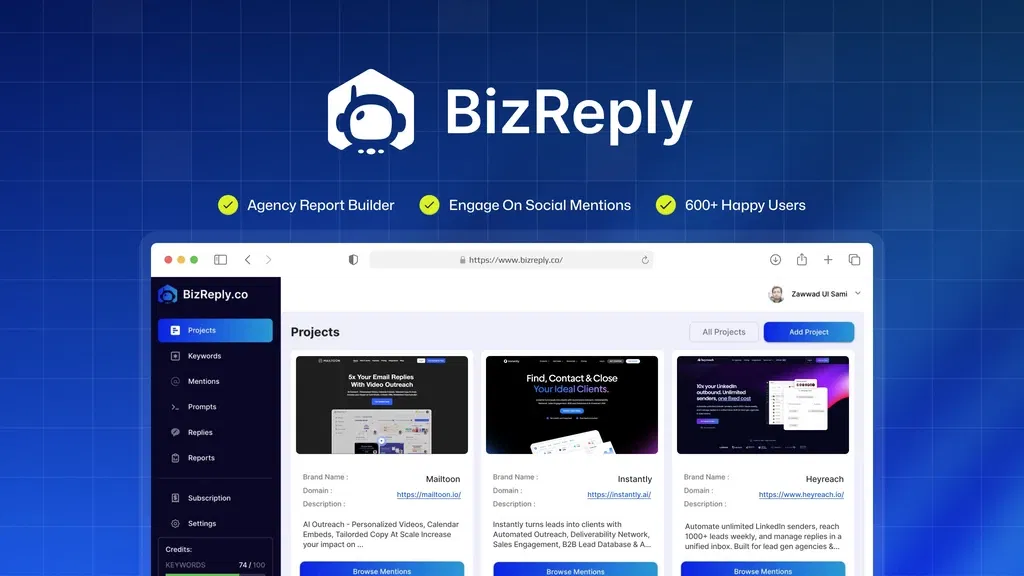
BizReply flips the usual social media workflow on its head. Instead of helping you publish content, it helps you find conversations worth joining.
It tracks keyword mentions across platforms and uses AI to draft on-brand replies, so you’re engaging in real time instead of scrolling for opportunities.
Who should use it
Marketing agencies and social media managers who care more about showing up in the right conversations than scheduling posts. Think community management, brand monitoring, and reputation building.
Key features
- AI-generated and custom keyword tracking, with negative keywords to filter noise
- One-click AI reply generation with adjustable tone and a prompt library
- Branded, client-ready PDF engagement reports
- Coverage across all 8 major social platforms
- Bring-your-own-API-key support for OpenAI, Gemini, Claude, and more
Supported platforms
All 8 major social networks, including YouTube as of a recent update.
AppSumo pricing/deal
Three lifetime tiers – $69 (50,000 mentions, 200 AI replies/month, 1 team seat), $149 (150,000 mentions, 500 replies, 3 seats), and $289 (450,000 mentions, unlimited replies, 10 seats). All include the client report builder. 60-day money-back guarantee; no code stacking.
Biggest advantage
The client-report builder makes it genuinely agency-ready; you can hand a branded PDF to a client instead of screenshotting a dashboard.
Biggest limitation
You need your own AI API key (BYOK), so factor in that ongoing cost. The lifetime deal covers the platform, not the AI usage behind it.
5. Pinflux – Best for Pinterest Growth & Auto-Engagement

What it does
Where Pin Generator focuses on creating and publishing pins, Pinflux focuses on growing your Pinterest presence around them – finding quality pins and boards by keyword, auto-scheduling at peak audience times, repinning high-performing content, and automatically following (and unfollowing non-followers-back) within your niche.
Who should use it
Ecommerce sellers and social media managers who already have pin content but want to build an audience and reach on Pinterest without manually networking all day.
Key features
- Keyword-based discovery of quality pins and boards
- Auto-scheduling timed to when your audience is most active
- Automatic repinning of high-performing content in your niche
- Auto-follow/unfollow to build a niche following organically
- Runs as a background desktop app, plus built-in Pinterest marketing training
Supported platforms
Pinterest only.
AppSumo pricing/deal
One-time payment of $99 (down from a $328 listed value) for lifetime access to the Elite + Pro version. 60-day money-back guarantee; deal is not stackable.
Biggest advantage
The growth automation (follow/unfollow, auto-repin) is something Pin Generator and most schedulers don’t touch. It’s built specifically for building Pinterest reach, not just posting content.
Biggest limitation
It’s a Windows-only desktop application, not a cloud dashboard. Mac users and anyone wanting browser/mobile access will need a workaround.
6. ViralSky – Best for AI-Generated Viral Content

What it does
ViralSky attacks the “blank page” problem head-on. Feed it a topic, and it generates viral-ready threads, standalone posts, quote-card images, and news-driven content using templates trained on hundreds of millions of viral views instead of the generic, robotic output you get from asking a general AI chatbot for a caption.
Who should use it
Content creators, influencers, and solo marketers who post frequently and need a steady output of scroll-stopping content without spending hours drafting from scratch.
Key features
- 50+ proven templates for threads, posts, and news-driven content
- Multiple LLM options (Claude, GPT, Gemini, Grok) so you’re not locked into one model’s voice
- AI image generation (Nano Banana 2/Pro) for memes, quote cards, and charts
- Instant idea generation – 10 fresh topic angles per niche on demand
- One-click refinement to adjust hooks, length, or tone before publishing
Supported platforms
Built for multi-platform publishing, including X, Facebook, Threads, and LinkedIn.
AppSumo pricing/deal
Three lifetime tiers, credit-based: $49 (550 credits/month), $119 (1,600 credits/month, recommended), and $199 (5,000 credits/month). All plans include lifetime access to future templates and AI models. 60-day money-back guarantee.
Biggest advantage
It’s genuinely fast; the founders claim 30 pieces of content in 30 minutes, which matters if content volume, not scheduling logistics, is your bottleneck.
Biggest limitation
It’s a content generator, not a full scheduler; you’ll still need somewhere to actually queue and publish what it creates, and credits (2 per post, 5–10 per image) can burn quickly at high volume.
7. Yorby – Best for AI UGC Video & Competitor Research

What it does
Yorby generates ready-to-post, UGC-style videos using AI avatars. Upload an avatar image and a product demo, and it produces a video in minutes.
It also lets you “remix” viral TikTok, Instagram, or YouTube videos into scripts for your own product, and tracks competitor accounts to flag breakout content early.
Who should use it
SaaS founders, marketing agencies, and social media marketers who know UGC-style video drives conversions but don’t have the budget or bandwidth for casting, filming, and editing real creators.
Key features
- AI avatar-based UGC video generation from a single image and product demo
- Viral video “remix” breaks down hooks, pacing, and structure from real viral content into a usable script
- Searchable database of high-performing videos filtered by date, format, and engagement
- Competitor account spy tool with follower count, average views, and engagement rate tracking
- Multiple video formats (hook + demo, text-on-screen, etc.)
Supported platforms
Built around content for Instagram, TikTok, and YouTube.
AppSumo pricing/deal
Five lifetime tiers from $69 (500 credits/month) up to $899 (4,000 credits/month, AppSumo Plus exclusive), with unlimited seats on every tier.
Lower tiers restrict access to the viral database, competitor spy tool, and AI content studio. 60-day money-back guarantee; new Yorby users only.
Biggest advantage
The competitor-spy and viral-remix combo is genuinely differentiated. It’s less about scheduling and more about knowing what to make before you make it, which most social tools skip entirely.
Biggest limitation
It’s a young product (founded late 2025) with a thinner review base and a lower average rating than the other picks here. Plus AI avatar UGC still reads as synthetic to some audiences, which can hurt trust if overused.
8. Latitude – Best for LinkedIn-Only Founders & Job Seekers

What it does
Latitude is a focused system built entirely around one platform – LinkedIn. It drafts posts in your own voice, scores your opening hook against benchmarks from similar profiles before you publish, schedules at optimal windows, and tracks impressions, reach, and engagement so you know what’s actually landing.
Who should use it
Founders, consultants, and job seekers who’ve decided LinkedIn is their one channel worth doing well, not marketing teams juggling five platforms at once.
Key features
- AI drafting calibrated to your personal voice and writing samples
- Hook scoring with rewrite suggestions before you post
- Import past LinkedIn posts so the AI learns from what already worked
- Monthly content calendar with auto-placed drafts at optimal times
- Post-level analytics: impressions, reactions, comments, engagement rate
- MCP support (Tiers 2–3) to work directly from Claude or another AI assistant
Supported platforms
LinkedIn only – personal profiles, with company page support on higher tiers.
AppSumo pricing/deal
Three lifetime tiers – $69 (1 account, 15 posts/month), $149 (3 accounts, 45 posts/month, recommended), and $349 (5 accounts, 75 posts/month). New users only. 60-day money-back guarantee.
Biggest advantage
It deliberately stays out of your comments and DMs. It’s a drafting and scheduling assistant, not an engagement bot, which keeps your account safer than tools that automate outreach.
Biggest limitation
Single-platform by design. If LinkedIn is one channel among several you manage, you’ll still need a separate tool for everything else.
Which AppSumo Social Media Tool Should You Choose?
Choose SocialBu if you manage more than one platform and need one dashboard for scheduling, inbox, and analytics. This is the closest thing to a true Buffer or Hootsuite replacement on the list.
Choose Latitude if your priority is LinkedIn and nothing else. You’re a founder, consultant, or job seeker who’d rather nail one channel than spread thin across five.
Choose Pin Generator or Pinflux if Pinterest is your main traffic channel. Use Pin Generator if you need pins created and published from your existing content; use Pinflux if you already have pins and need growth – following, repinning, discovery.
Choose BizReply if you’re an agency that needs to prove engagement value to clients. The branded PDF reports and multi-brand tracking justify the extra step of bringing your own AI API key.
Choose ViralSky if your bottleneck is content, not logistics. You need a steady stream of scroll-stopping threads, posts, and images without staring at a blank page every morning.
Choose Yorby if you need UGC-style video content and want to know what’s already working for competitors before you create anything.
Choose Linke if you need one point to manage everywhere your bio link sends people, especially if retargeting and click-level analytics matter to you.
Also Read: How to Pick the Best AppSumo Deals (Avoid Wasting Money)
Frequently Asked Questions
What are the best social media management tools on AppSumo?
SocialBu, BizReply, Pin Generator, Pinflux, ViralSky, Yorby, Latitude, and Linke each solve different jobs like scheduling, engagement, Pinterest growth, LinkedIn, or AI content creation, so “best” depends on your specific need.
Does AppSumo have social media management tools?
Yes. AppSumo runs a dedicated social media management collection covering scheduling, publishing, engagement, analytics, and platform-specific tools like Pinterest and LinkedIn automation, alongside broader marketing software categories.
Are AppSumo social media tools lifetime deals?
Most are. You pay once for lifetime access instead of a recurring subscription, though some tools use credit-based tiers, meaning ongoing usage still has monthly limits attached.
Are AppSumo lifetime deals worth buying?
Only if the tool matches a real, ongoing need. A lifetime deal saves money long-term, but an unused feature-rich tool is worse value than a cheap one you’ll actually use.
Final Verdict – Which AppSumo Social Media Tool Is Right for You?
If you only take one thing from this guide: buy for the job, not the discount.
Managing multiple platforms? Start with SocialBu; it’s the one tool here built to be your entire command center.
Everything else on this list is a specialist, worth adding only once a specific channel (Pinterest, LinkedIn) or task (engagement, content creation) proves it deserves its own tool.
A lifetime deal only pays off if you’re still using it a year from now, so pick the narrowest tool that solves your actual bottleneck today.
Ready to stop paying monthly for software you could own outright? Browse AppSumo’s social media management collection and grab the deal that matches your workflow.
Related Articles
28 Best Appsumo Deals For Startups Every Founder Should Consider
Best AppSumo Email Marketing Deals Worth Buying for Business Growth
Best AppSumo SEO Deals for Bloggers, Marketers & Website Owners
Best AppSumo Hidden Gems: Surprisingly Good Deals Worth Buying

TechnicalStudies was started by Neeladrinath with one simple idea — give Indian students a reliable place to figure out what’s actually worth their time and money. Every recommendation here is backed by careful research, real student feedback, and honest analysis. We cover online courses, laptops, smartwatches, software deals, and learning resources — all looked at from a student’s perspective, so you can spend less time guessing and more time learning.